Transform Your Selfies into 3D Figurines with Nano Banana 2 API via APIPASS
Learn how to turn selfies into 3D figurines using Nano Banana 2 API via APIPASS. Step-by-step workflow, prompt tips, and cost comparison included.
Few AI image generation use cases capture people's imagination quite like turning a selfie into a collectible 3D figurine. The idea of seeing yourself rendered as a limited-edition action figure — complete with display base, packaging box, and studio lighting — sits at the intersection of creative novelty and genuine commercial utility. It powers everything from personalized merchandise platforms to Kickstarter campaign previews to one-off gifts. And with the February 2026 launch of Nano Banana 2, this workflow has become more reliable, more detailed, and more accessible than ever before.
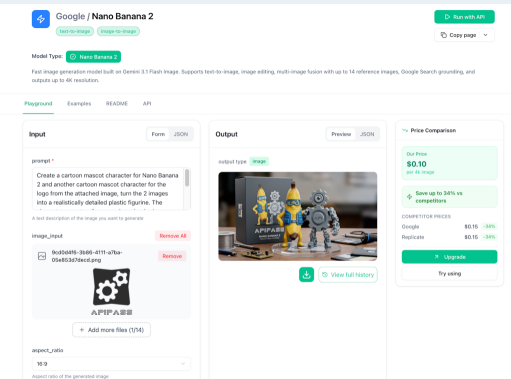
This tutorial walks through the complete selfie-to-figurine process using the Nano Banana 2 API accessed through APIPASS API Marketplace — the unified API platform that provides Nano Banana 2 access at the most competitive rate available. The focus here is on the practical workflow and, most importantly, how to write prompts that consistently produce professional-quality results.
Nano Banana 2 vs. Nano Banana Pro for Figurine Generation
Before diving into the workflow, it is worth understanding why Nano Banana 2 — not Nano Banana Pro — is the right model for this use case.
Nano Banana Pro uses a deliberative "Thinking" architecture that applies sequential reasoning to complex compositional instructions. That makes it well-suited for hero images requiring the highest photorealism ceiling, or for multi-element compositions with intricate spatial logic. But for a selfie-to-figurine pipeline, that deliberative overhead works against you: Pro generates roughly twice as slowly as Nano Banana 2, and its reasoning mode does not meaningfully improve the output quality for the specific requirements of figurine generation.
Nano Banana 2, by contrast, is built on Gemini 3.1 Flash Image and optimized for exactly the combination of capabilities this workflow demands. It maintains subject consistency across up to five simultaneous characters — meaning the figurine in your output will actually look like the person in the selfie, preserving facial features, proportions, and distinctive details even after full stylistic transformation. Its enhanced instruction following means complex prompts specifying scale, base design, packaging, pose, and lighting are now reliably honored in a single generation pass. And its vibrant lighting and richer texture rendering is precisely what makes a 3D figurine image read as a convincing physical object rather than a flat illustration.
At roughly 30 seconds per generation and significantly lower per-image cost than Pro, Nano Banana 2 via APIPASS is the practical default for any figurine generation workflow — whether you are prototyping, iterating on prompt designs, or running a production pipeline at volume.
What You Will Need
Getting started requires three things: a selfie, a prompt, and an APIPASS API key.
For the selfie, use a well-lit, front-facing photo with a clear view of the subject's face and upper body. This is the single most important technical input variable. Nano Banana 2 renders what it sees — a dark, blurry, or heavily shadowed photo produces a dark, detail-poor figurine. Natural daylight facing the subject, or soft indoor lighting without harsh shadows, gives the model the information it needs to maintain accurate facial resemblance across the stylistic transformation.
For your APIPASS API key, create an account at apipass.dev and generate your key from the API Key Management section of your dashboard. Authentication for all requests uses a Bearer token in the Authorization header.
How the APIPASS Workflow Works
The Nano Banana 2 API on APIPASS uses a simple two-step process. First, you submit a generation request — providing your model, your prompt, and a publicly accessible URL of your selfie image — and receive back a task ID. Second, you check that task ID periodically until the state returns as success, at which point the response includes a URL to your generated image.
The five states your task moves through are: waiting, queuing, generating, success, and fail. Generation typically completes within 30 seconds. If you are building this into a larger application or automation, APIPASS also supports a callback URL — you can provide a webhook endpoint in your initial request, and APIPASS will notify it automatically when your image is ready, so you do not need to poll at all.
The entire interaction requires nothing beyond standard HTTP requests. No SDK installation, no Google Cloud project setup, no Vertex AI configuration — just your APIPASS key, your selfie URL, and your prompt.
Writing Prompts That Actually Work: The Core Skill
This is where most people underinvest when building figurine generation workflows, and it is where the quality gap between a mediocre and a professional output is determined. Nano Banana 2's enhanced instruction following means it will actually honor a detailed, specific prompt — so the effort you put into prompt design pays off directly in output quality.
A strong figurine prompt has five components: the figurine itself, the scale and style, the base, the environment, and the lighting. Here is how to think about each.
The Figurine Itself
Start by describing what the figurine is — a collectible figure of the character in the image — and specify the style register: realistic collector's edition, anime-style, chibi, military action figure, fantasy hero. Be explicit. "Realistic 3D figurine" and "chibi-style collectible figure" will produce completely different outputs from the same selfie, and both are valid depending on your use case.
Specify the pose. A neutral standing pose is the default if you say nothing, but dynamic poses — a confident three-quarter stance, an action pose with one arm raised, a sitting pose with crossed arms — dramatically improve the visual interest of the final output. The more specifically you describe the pose, the more reliably Nano Banana 2 will reproduce it.
Scale and Finish
Include a figurine scale if relevant to your use case. 1/7 scale and 1/4 scale are standard collector's edition proportions and signal to the model the kind of detail density and visual weight appropriate for the output. Also specify the surface finish: painted PVC with matte finish, high-gloss resin, or hand-painted collector's quality each push the model toward different texture and material treatments.
The Display Base
Always describe the base explicitly. A well-specified base dramatically improves how professional and complete the output looks. Common and effective options include: round transparent acrylic base with no text, black circular base with engraved character name, or themed environmental base matching the character's setting. If you do not specify a base, the model will either invent one or omit it entirely — neither of which is reliably what you want.
The Environment
The setting around the figurine has an outsized effect on how the output reads as a photograph. A figurine floating against a plain white background looks like a product cutout. A figurine placed on a desk with context around it — a keyboard, a monitor in the background, soft natural light from a window — reads as a real object in the world. Describe the display surface, any props, and what is visible in the mid-ground and background.
For packaging shots, describe the box explicitly: collector's packaging box with rounded corners, transparent front window showing the figurine, matte finish box art with the character's name. Nano Banana 2 is capable of rendering the figurine, the base, and the packaging as separate coherent elements in a single composition — but only if you specify all three.
Lighting
Lighting is what separates a flat render from a convincing three-dimensional object. Soft studio lighting with subtle shadow is the reliable safe default for product photography aesthetics. Warm side lighting with rim light creates drama. Natural daylight from the left with soft fill reads as editorial. Avoid simply writing "good lighting" — the model responds to specific descriptions, not general quality cues.
A Full Example Prompt
Putting all five components together:
"Create a 1/7 scale collectible 3D figurine of the character in the image, in a realistic painted PVC collector's edition style. The character is in a confident three-quarter standing pose with arms at sides. The figurine stands on a round transparent acrylic base with no text. The scene is set on a clean wooden desk with soft studio lighting from the upper left, creating subtle shadows. In the background, slightly out of focus, is a collector's packaging box with a transparent front window and rounded corners showing the figurine inside. Shot as a professional product photograph."
This level of specificity is what Nano Banana 2's enhanced instruction following is built to honor. Iterate from this template, adjusting the pose, scale, style register, and environment to match your particular creative direction.
Why APIPASS API Marketplace Is the Right Platform for This Workflow
Building a figurine generation pipeline means running the model repeatedly — testing prompt variations, iterating on results, and eventually handling real user volume. At that point, per-image cost becomes a real operating consideration, and this is where APIPASS API Marketplace makes a material difference.
APIPASS provides the Nano Banana 2 API at rates that beat Google's official Gemini API at every resolution tier, while routing to the identical underlying model:
Model | Resolution | APIPASS API | Google Gemini API (Official) |
Nano Banana 2 | 1024px (1K) | $0.046 / image | $0.067 / image |
| 2048px (2K) | $0.068 / image | $0.101 / image |
| 4096px (4K) | $0.100 / image | $0.151 / image |
Nano Banana Pro | 1024px (1K) | $0.086 / image | $0.134 / image |
| 2048px (2K) | $0.091 / image | $0.134 / image |
| 4096px (4K) | $0.173 / image | $0.240 / image |
For figurine generation at 2K resolution — the practical sweet spot between output quality and cost — APIPASS charges $0.068 per image versus Google's $0.101. That is a 33% saving on every generation, with no difference in model output. For a platform generating 5,000 figurine images per month at 2K, the saving is $165 monthly — $1,980 annually — without any change to the underlying model or output quality.
For individual creators testing and iterating on prompt designs, the lower cost per generation extends how much experimentation is financially practical before committing to a final prompt template. For teams building production pipelines, the savings compound directly into improved unit economics. Either way, APIPASS API Marketplace is the most cost-effective access point for the Nano Banana 2 API — same model, same quality, lower cost at every resolution tier.
🔥 Limited Time Deal
NewGet lifetime access to Postunreel with a one-time payment. Never pay again!
Your Go-To Solution for Stunning Carousels using AI!
Postunreel is a free AI carousel generator tool that helps you design captivating carousel posts for LinkedIn, Instagram, and other platforms. It makes it easier to increase social media engagement and grow your audience.
Create Free Carousel Now 🚀Related Blogs
Black and White Filter: Color to Use & Why (2026)
Flat B&W photos? A black and white filter fixes that. See which color to buy first, how to use it, and how to get the look in Lightroom.
Free Photo Editing App for iPhone: 7 Picks 2026
Snapseed is the best free photo editing app for iPhone in 2026. Compare 7 free editors, see which have no watermarks, and edit like a pro.
How to Resize an Image on iPhone (2026 Guide)
Resize an Image on iPhone in seconds. Free built in methods, exact pixel dimensions & platform sizes for Instagram, LinkedIn & more.