URL Encoder and Decoder SpellMistake: Fix Broken Links and Encoding Errors (2026 Guide)
Learn how a URL encoder and decoder fixes broken links, %20 errors and double encoding. Follow the step by step guide, then try SpellMistake today.
A URL encoder and decoder converts unsafe characters into safe %XX codes (encoding) and turns them back into readable text (decoding). You use one to fix broken links, protect query string data and avoid double encoding.
Ever pasted a link and watched it die?
I've been there. One stray space, one unescaped &, and your campaign link is toast.
Here's the good news: it's an easy fix. Let's dive in.
What Is a URL Encoder and Decoder?
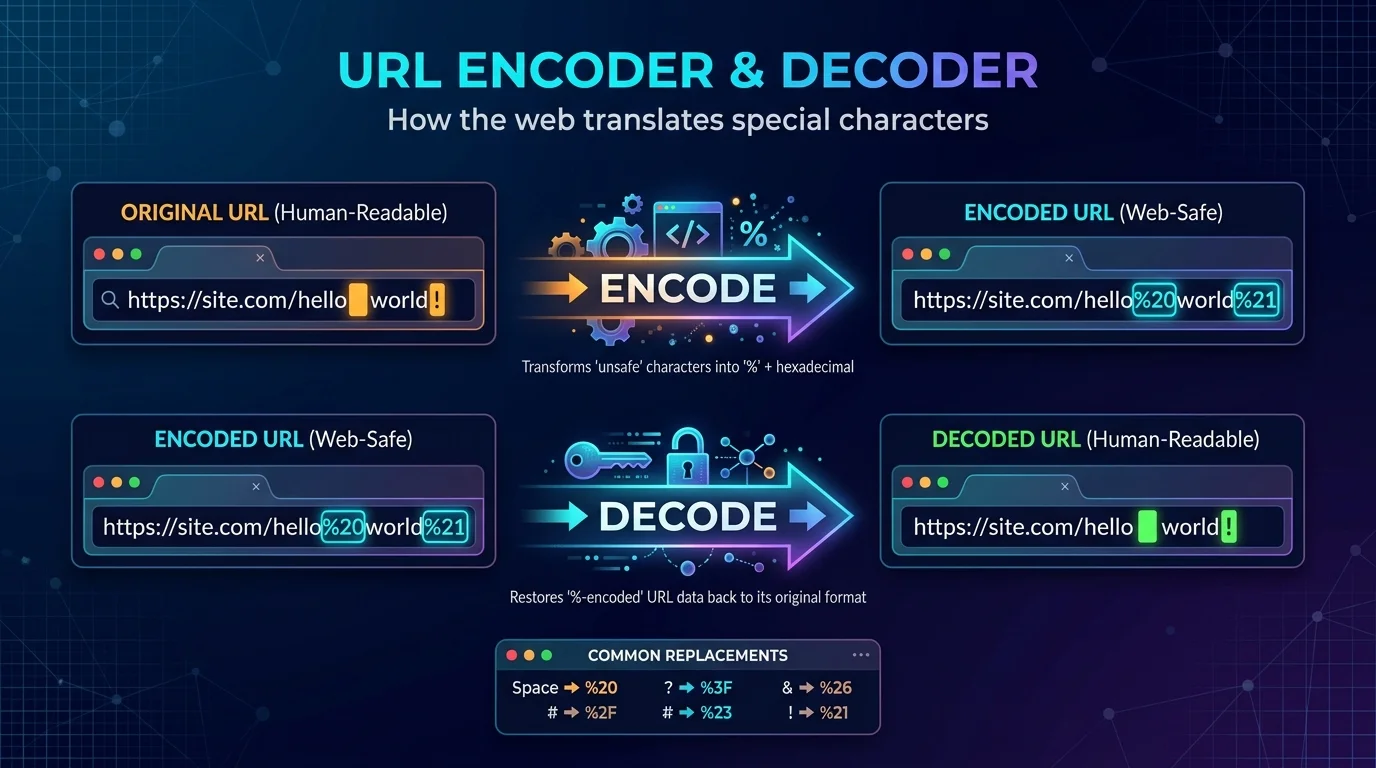
Think of URLs as picky eaters. They only accept a small menu of characters, and everything else needs a disguise. That disguise is called percent-encoding, and a URL encoder does the dressing up for you. A URL decoder does the reverse, so you can read what's inside a messy link. The rules come from RFC 3986, published in January 2005, and they still run the web today.
Here's what that looks like in real life:
A space becomes %20
An ampersand (&) becomes %26
A literal percent sign becomes %25
Simple, right?
Safe characters never need encoding. Those are letters, digits, hyphens, underscores, periods and tildes. Everything else gets converted. If you're curious about the history, the idea dates back to RFC 1738 in 1994.
Why URL Encoding Errors Break Your Links
You might be wondering, "Is this really a big deal?"
Yes. And here's why.
Most URL encoding errors are quiet. Nothing crashes. Your link just goes to the wrong place, drops a parameter, or returns a 404. Meanwhile, you're left guessing. In my experience, the culprit is almost always one of these:
Manual editing: someone types a space or a
#straight into a linkWrong encoding scope: you encode the whole URL when you should encode only one value
Double encoding: the same text gets encoded twice
Typos in tools: people search for "url encorder" or "url decorder" and land on the wrong utility
Honestly, the fix is the same every time. Use a reliable URL encode tool instead of guessing.
By the way, if you also care about how crawlers read your links, check out our guide to technical SEO. Clean URLs are a big piece of that puzzle.
Step by Step: How to Encode and Decode a URL
Let me show you the exact process I use. It takes about thirty seconds, and you don't need to be a developer. The trick is knowing which part of the link to encode. Most people paste the entire URL and hope for the best. Don't do that. Work through these steps instead, and you'll avoid nearly every special characters in URL headache.
To encode a URL:
Pick the piece that needs protection, such as a search phrase or a parameter value.
Paste it into your URL encoder.
Click encode.
Copy the result and drop it into your link.
Test the link in a fresh browser tab.
To decode a URL:
Copy the messy link.
Paste it into a URL decoder online.
Click decode.
Read the clean text and spot what's wrong.
Pretty easy, huh?
One more tip: decode only once. If you still see %25 after decoding, you've probably hit a double encoding bug.
encodeURI vs encodeURIComponent (And Why Developers Mix Them Up)
If you write code, this part will save you hours. JavaScript gives you two similar functions, and they behave very differently. Pick the wrong one and your query string either breaks or leaves dangerous characters untouched. The short version: use one for whole addresses and the other for individual values. Here's the cheat sheet.
Method | Best for | Encodes | Space becomes |
|---|---|---|---|
| A full URL | No | %20 |
| One parameter value | Yes | %20 |
Form encoding | HTML form data | Yes | + |
The MDN documentation for encodeURIComponent covers the details. And as a GeeksforGeeks comparison explains, encodeURI keeps characters like :, /, ? and & intact.
Python fans, you're covered too. The urllib.parse module offers quote() and unquote(). Just remember that quote() leaves / alone by default.
Why does form encoding use a plus sign?
Good question. That quirk is a leftover from the HTML 2.0 era (RFC 1866, 1995). Standard percent-encoding uses %20 for spaces, while form data uses +. Mixing them up is a classic bug, so always check which one your system expects.
How Double Encoding Hurts Security and SEO
Now for the scary part.
Double encoding happens when already encoded text gets encoded again. A % turns into %25, so %20 becomes %2520. Annoying, but harmless? Not always.
Attackers use this trick to sneak past filters. According to OWASP, the attack works on security checks that decode input only once. The pattern is also catalogued as CAPEC-120. That's why security guidance says to decode once, then validate.
It hurts SEO too. When two versions of the same link exist, search engines can treat them as separate pages. Google's URL structure guidance recommends keeping URLs clean and consistent. Want to go deeper? Our post on how to generate robots.txt files with SpellMistake shows another way to keep crawlers on the right paths.
Why You Should Use SpellMistake for URL Encoding
Okay, here's where I get opinionated.
You can encode links by hand. But why would you? One tiny slip costs you clicks, leads and trust. A dedicated URL encoder and decoder removes the guesswork, and that's exactly why I recommend SpellMistake.
Here's what you get:
Speed: paste, click, done
Accuracy: no more forgotten
%signsOne toolbox: it sits alongside other SEO utilities, which we cover in our roundup of the best SpellMistake SEO tools
Peace of mind: your campaign links work the first time
So here's my advice. Don't wait for the next broken link to ruin your launch. Try SpellMistake today, run your three most important links through it, and see what it catches. You'll wonder why you ever did this by hand.
FAQ: URL Encoder and Decoder Questions
What is a URL encoder? It's a tool that converts unsafe characters in a link into %XX codes so the URL works everywhere.
What does %20 mean in a URL? It's the encoded version of a space.
What's the difference between encodeURI and encodeURIComponent? encodeURI is for full URLs and leaves / ? & # alone. encodeURIComponent is for single values and encodes them.
Can encoding mistakes hurt SEO? Yes. They can create duplicate or broken URLs, which confuses crawlers and wastes your link equity.
Is double encoding dangerous? It can be. Attackers use it to dodge filters that decode input only once.
Final Thoughts
Let's recap.
A URL encoder and decoder keeps your links clean, your data safe and your campaigns running. Encode only what needs it. Decode once. Test every link.
And if you'd rather skip the manual work, give SpellMistake a spin and let it do the heavy lifting.
Go fix those links. Your future clicks will thank you.
About the Author

Nathan Cole
Nathan Cole is a SaaS writer and AI product reviewer at Postunreel with a sharp focus on evaluating AI-powered tools for content creators, marketers, and growing businesses. He holds a degree in Computer Science and brings over five years of experience writing about software products, productivity tools, and marketing technology. Nathan approaches every review with rigorous hands-on testing, clear comparison frameworks, and an honest perspective that cuts through marketing hype. His goal is to help Postunreel readers make smarter decisions about the tools they invest in so they can build better content workflows without wasting time or money.
🔥 Limited Time Deal
NewGet lifetime access to Postunreel with a one-time payment. Never pay again!
Your Go-To Solution for Stunning Carousels using AI!
Postunreel is a free AI carousel generator tool that helps you design captivating carousel posts for LinkedIn, Instagram, and other platforms. It makes it easier to increase social media engagement and grow your audience.
Create Free Carousel Now 🚀Related Blogs
SQL Server Management Studio (SSMS): The 2026 Guide
Learn what SQL Server Management Studio is, what's new in SSMS 22, and how to install it step by step. Free download, system requirements, and FAQs.
GBP/JPY Forecast: What Recent Yen Gains Mean for the Market
Explore the latest GBP/JPY forecast as yen strength, Bank of Japan policy expectations, UK economic conditions, interest rates, and global market confidence shape the currency pair’s outlook.