From First Click to Final Decision: How UX Design Shapes User Behavior Online
Discover how UX design influences user behavior, builds trust, reduces friction, and improves conversions from the first click to the final decision.

Forget everything you know about “good design.” Most of what passes for UX wisdom today is just digital wallpaper. It’s pretty, polite, and completely forgettable.
We’ve analyzed hundreds of heatmaps and session recordings, and here’s what we’ve learned: Users don’t act the way designers hope they will. They behave the way the interface trains them to.
Often, the first click they make isn’t a conscious choice. It’s a reflex shaped by milliseconds of visual cueing, spacing, and the quiet architecture of expectation. Every scroll, every hesitation, and every tab abandoned mid-journey leaves behind a trail of honest answers most brands ignore.
We stopped ignoring those answers. Now, we’ll crack open the real mechanics of how UX sculpts decision-making before your visitor ever forms a conscious thought.
Visual Consistency Builds Trust Before Words Do
Users scan a page like they scan a room upon entering, hunting for cues that confirm they’re safe to proceed. Visual consistency hands them that confirmation without asking for conscious effort.
When colors, spacing, typographic rhythms, and interactive patterns repeat cleanly from header to footer, the brain relaxes into recognition mode. Each familiar signal becomes a small promise kept. Stack enough of those promises, and a visitor stops looking for reasons to leave.
We treat visual consistency as a core quality metric because it correlates directly with task completion rates and engagement depth. It’s also a key performance indicator you can track through reduced bounce rates, smoother scroll maps, and longer sessions. A cohesive interface trains users to trust what comes next.
So how do you bake this into your own brand?
Check button styles across five sections. Do padding, border radius, and hover states match exactly?
Examine your heading hierarchy. Does each jump from H2 to body text follow consistent ratios?
Build a visual pattern library that locks in your palette, spacing increments, shadow depths, font pairings, and iconography.
Apply these rules without exception. Every new section should echo the visual language that returning visitors already recognize.
Run a five-second recall test next. Show someone your page briefly, then ask what stuck.
Consistent design leaves clear anchors. Clutter leaves noise.
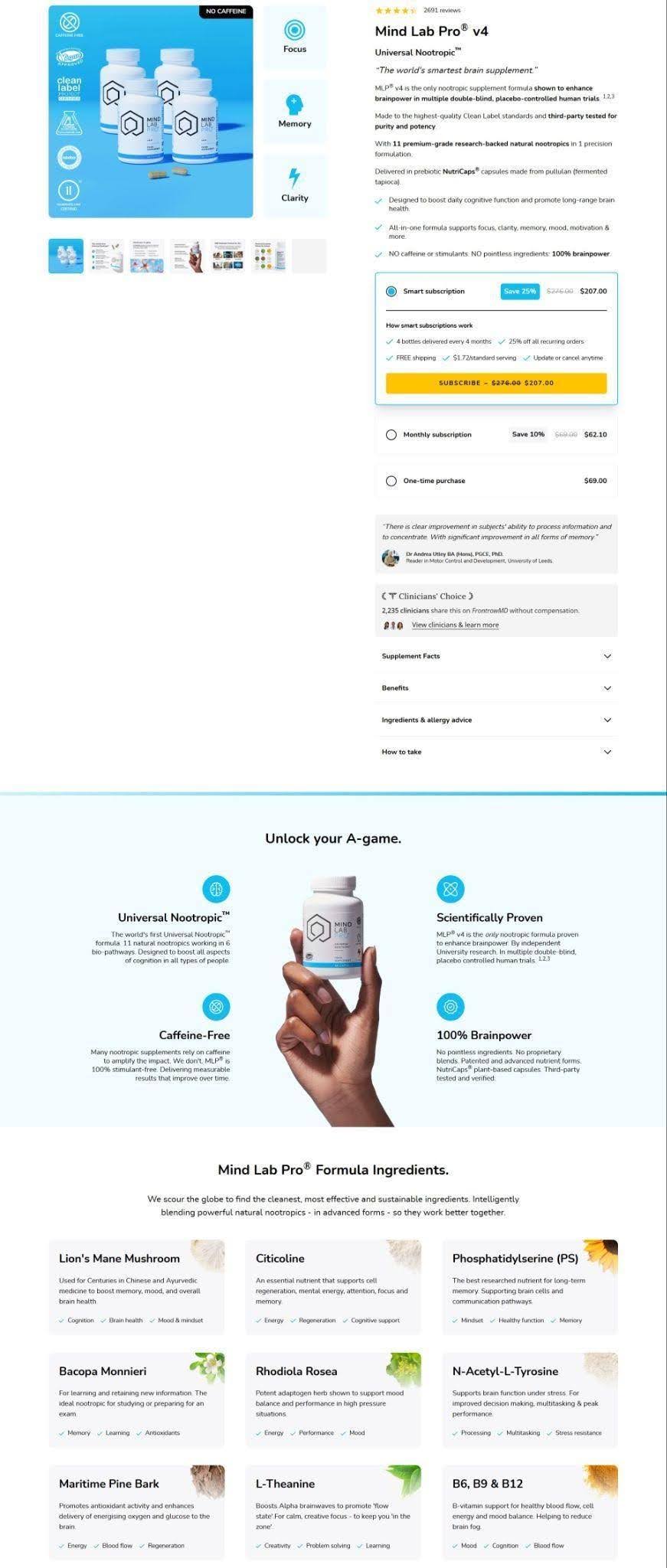
An example that shows this is Mind Lab Pro, a universal nootropic supplement brand. They nail visual consistency on their Mind Lab Pro v4 product page.
The navigation stays stripped to essentials. The hero section presents the bottle plainly with typography matching the label’s clean confidence. Benefits, transparent ingredient infographics, clinical references, trust badges, and verified reviews all inherit identical spacing and color restraint as you scroll. CTAs appear only where context feels complete. Nothing competes.
The page feels engineered for trust, and that shapes every decision a visitor makes next.
Source: mindlabpro.com
Genuine Imagery Carries the Pitch
Stock photography fills a gap, but it rarely closes a sale. Visitors can spot a generic handshake photo or a staged smiling family within seconds, and that recognition quietly chips away at trust.
Authentic images work differently. They show visitors the actual thing they’re considering, not a stand-in meant to suggest a feeling. The difference shows up in how long people stay on a page and how confident they feel about clicking further.
To put this into practice:
Replace placeholder or licensed stock photos with images of your actual product, space, team, or process.
If you sell a physical product, photograph it in real use, not against a sterile white backdrop alone.
If you run a service business, show the actual people clients will work with.
Invest in professional photography rather than relying on phone snapshots, since lighting and composition still matter for clarity.
Keep filters and heavy editing minimal so the images reflect reality.
Caption photos with specific, useful details instead of vague praise, and update them regularly so the site never shows something that no longer exists.
John Campbell, a real estate professional who helps buyers find homes, demonstrates this well on his site.
The landing page dedicated to properties in Bluffton, South Carolina, shows current listings through professional photography that highlights space, light, and detail. Visitors see the craftsmanship and layout clearly, without filters or staged lifestyle scenes layered on top. There’s no stock imagery trying to suggest value that isn’t there. The properties themselves provide the proof.
This approach matches how people actually evaluate real estate online. Visitors want to see what they might buy, not an abstract idea of it. Campbell’s pages respect that expectation and let the visuals carry the weight the copy alone couldn’t.

Source: johnsellshiltonhead.com
Personalization Guides Visitors Toward the Right Choice
A shopper facing forty nearly identical products often does nothing at all. Too many options trigger doubt instead of confidence, and that doubt frequently ends in an abandoned tab rather than a purchase.
Personalization solves a real problem here, not a cosmetic one. Guiding visitors toward products or content that actually fit their needs cuts down on decision fatigue and makes the path to checkout feel obvious instead of overwhelming.
When a site narrows the field for someone, it removes the burden of comparing dozens of similar items on their own. That shift turns browsing into something closer to getting advice from a knowledgeable friend.
Putting this into practice doesn’t require a complex algorithm:
Start with a short quiz or guided filter that asks two or three questions tied to what actually differentiates your products, like use case, style preference, budget, or skill level.
Keep the questions visual and quick, since long forms lose people fast.
Route the answers to a small set of curated picks rather than the entire catalog.
Track which questions lead to purchases and refine them over time.
Even a simple “shop by need” filter on a category page accomplishes a version of this without building anything elaborate.
Drift, a brand that makes scented air fresheners for cars and homes, shows this approach working in practice.
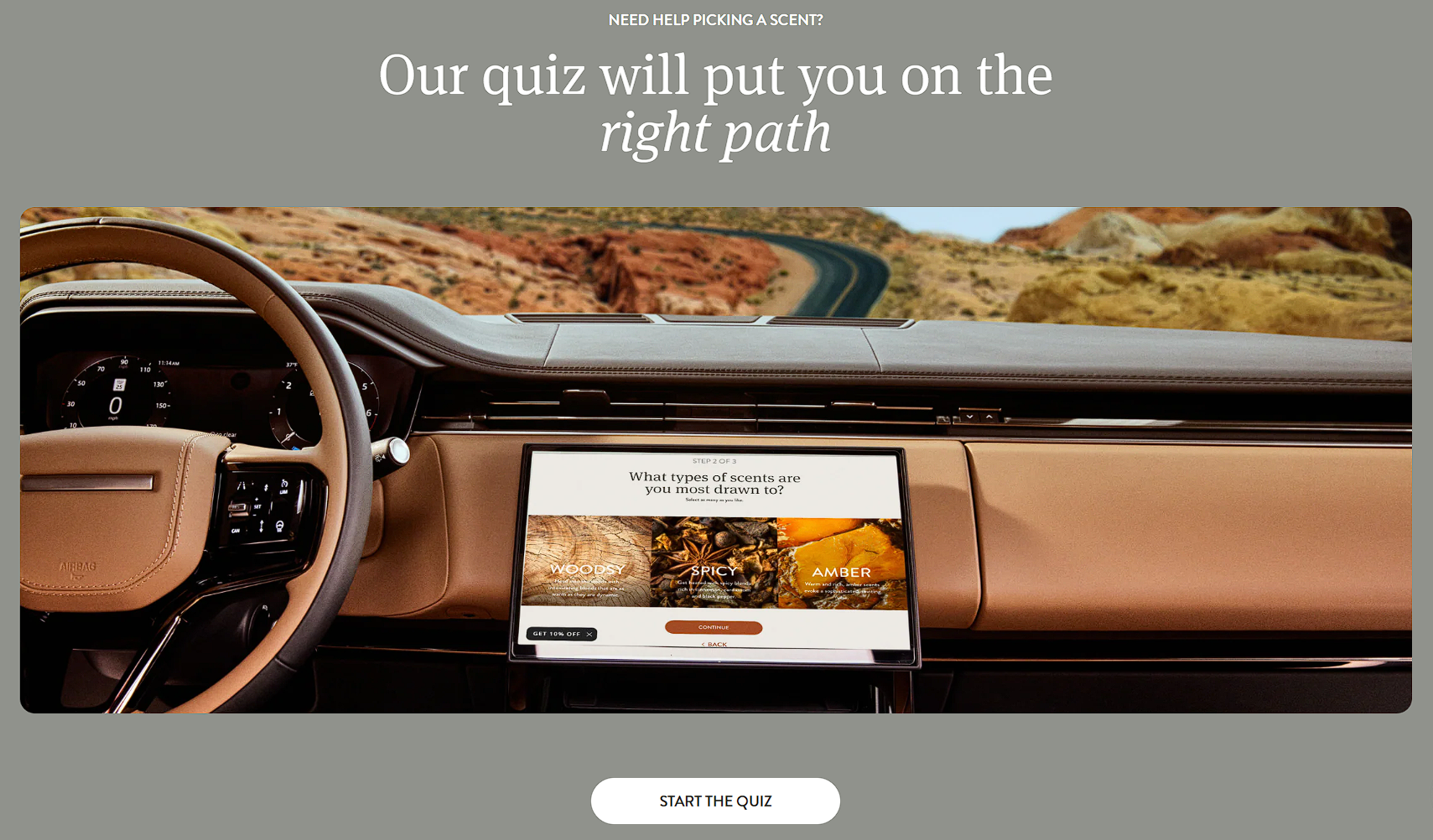
On their category page for car fresheners, they offer a quiz that helps customers pick the right scent for them. The quiz narrows preferences through short, visual prompts covering scent intensity, aesthetic style, and placement, leading each visitor to a curated recommendation in under a minute. Scrolling through endless product grids gets eliminated entirely.
By distilling their whole catalog into a few friendly questions, Drift turns what could feel like a mundane commodity purchase into a personalized, almost consultative experience.
Source: drift.co
Borrowed Customer Voices Shape the Decision Path
Marketing copy comes from the brand, so visitors read it with a filter on. On the other hand, customer testimonials come from someone with no stake in the sale, so people read them differently.
A potential buyer scanning a product page will skim past polished claims but slow down for a stranger’s honest sentence about their own experience.
That change in attention is why testimonials carry weight that brand copy can’t replicate on its own.
Implementing this well takes more than dropping a few quotes near the footer:
Source reviews from third-party platforms like Trustpilot or Google rather than writing them in-house, since visitors can spot manufactured praise.
Display your actual star rating prominently, and resist the urge to cherry-pick only five-star reviews. A handful of four-star or three-star testimonials, especially ones that mention a minor drawback, make the five-star reviews believable instead of suspicious.
Place testimonials after you’ve explained your product or service, so visitors already understand what they’re reading about before they see someone else’s opinion on it.
Keep the original wording intact rather than smoothing it into marketing language.
Socialplug, a marketplace where people buy followers, likes, views, and comments for their social media accounts, applies this approach with care.
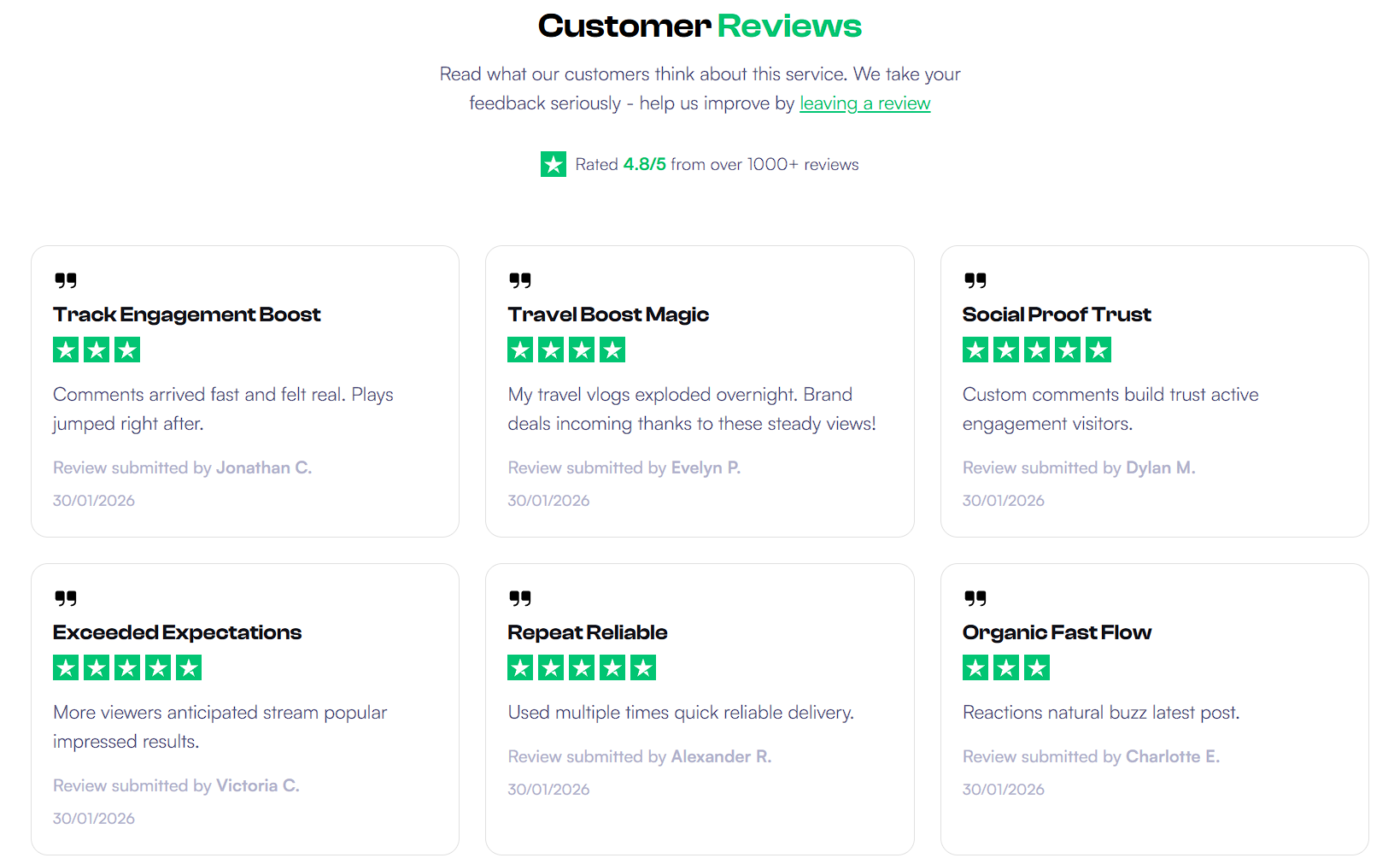
On their service page that offers Instagram followers, they lay out the offer, its value, and its benefits first, then follow with a dedicated section of customer testimonials. These reviews come straight from Trustpilot, which lends them outside credibility a brand-written quote couldn’t match. They also display their overall Trustpilot star rating alongside the reviews.
Crucially, the testimonials appear in customers’ own words, and the page doesn’t filter out anything below five stars. Four-star and three-star reviews sit right next to the glowing ones, giving the whole section a sense of honesty that a wall of perfect praise would lack.
Source: socialplug.io
Stripping Away Noise Makes Decisions Come Faster
Working memory has limits, and every unnecessary element on a page competes for a slice of it. A visitor trying to read your headline while dodging pop-ups, banners, and three competing CTAs spends mental energy on filtering instead of understanding. That filtering work adds up fast.
Poor design creates an extraneous load that overwhelms working memory, leaving visitors with less mental capacity to focus on your actual message. The brain can only hold so much at once, and cluttered layouts force it to spend that limited capacity sorting visual noise instead of absorbing what you’re trying to say.
By the time someone reaches your value proposition, they’ve already used up the attention they needed to actually care about it.
Cutting this load starts with subtraction, not addition:
Remove any element that doesn’t directly support the page’s main goal, including decorative graphics, redundant text, or extra navigation links that lead nowhere essential.
Increase whitespace around headlines, buttons, and images so each one gets room to register on its own.
Limit each section to one clear idea instead of stacking multiple messages together.
Choose one primary CTA per page rather than competing buttons that split attention.
Test your page by covering parts of it and asking whether the remaining content still makes sense. If it does, the covered part likely wasn’t necessary.
MailerLite, an email marketing platform that helps businesses build campaigns, automate workflows, and grow their audiences, demonstrates this well.
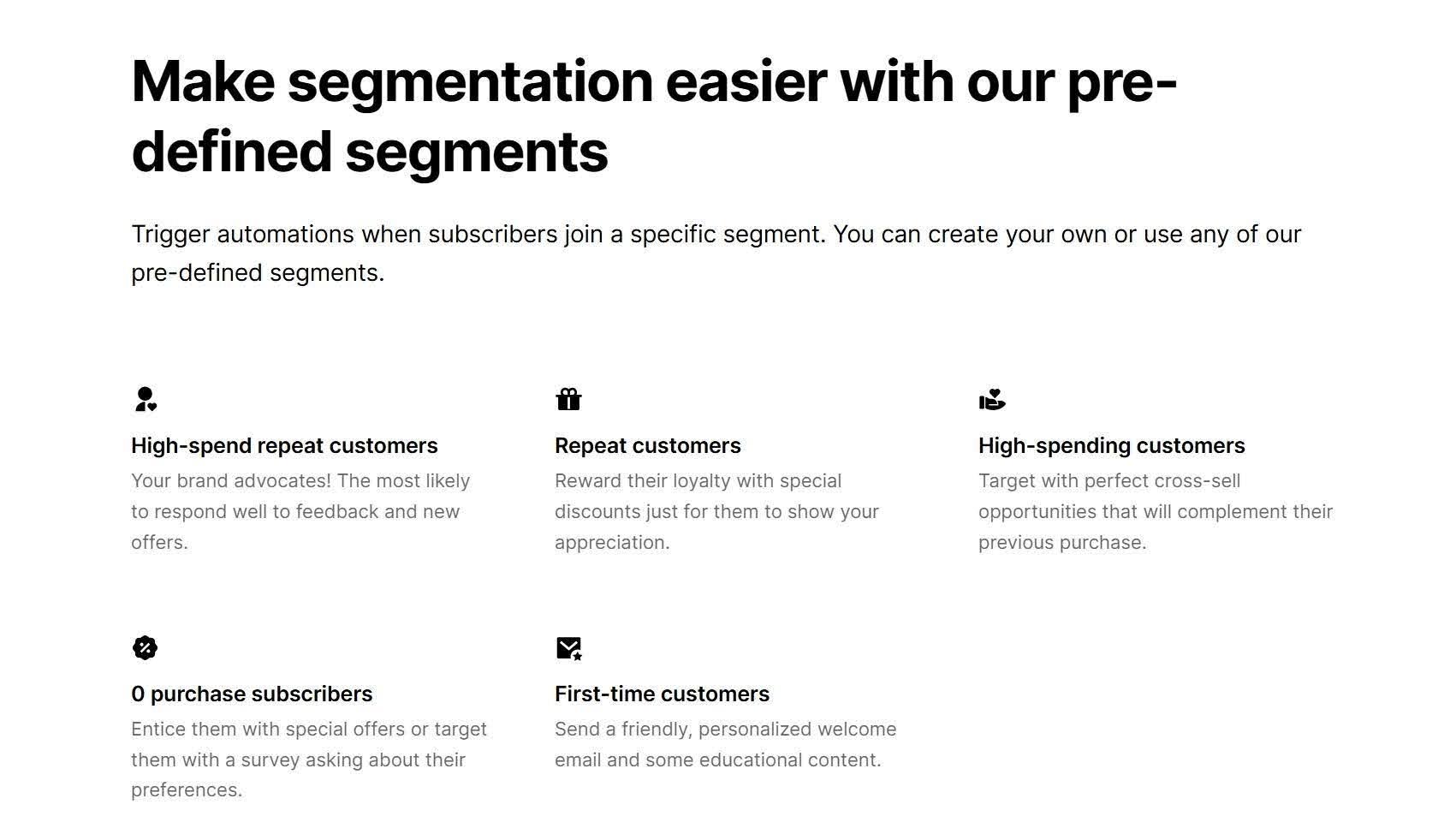
Their email marketing automation landing page keeps things deliberately minimal, with generous whitespace surrounding each element and separating every section so nothing feels crowded or rushed. This restraint lets features and benefits stand on their own clearly.
This way, visitors can move through the page in order, absorbing one idea at a time, without sorting through visual noise to find what actually matters to them.
Source: mailerlite.com
Final Thoughts
UX design shapes how people move from curiosity to action. Every visual choice, interaction pattern, and content structure influences how users read, compare, and decide.
When consistency, clarity, relevance, and restraint work together, visitors spend less effort figuring things out and more time engaging with what matters.
Strong UX leaves fewer points of friction across the journey. It supports faster understanding, steadier trust, and more confident decisions from the first click to the final step.
🔥 Limited Time Deal
NewGet lifetime access to Postunreel with a one-time payment. Never pay again!
Your Go-To Solution for Stunning Carousels using AI!
Postunreel is a free AI carousel generator tool that helps you design captivating carousel posts for LinkedIn, Instagram, and other platforms. It makes it easier to increase social media engagement and grow your audience.
Create Free Carousel Now 🚀Related Blogs
How to Change Instagram Story Background Color
See how to change Instagram story background color on iPhone and Android. Try 4 easy, free methods: solid fills, gradients and color tints.
How Big Is 4x6 Photo? Size in Inches, CM & Pixels
How Big Is 4x6 Photo inches (10.16 x 15.24 cm), or 1200 x 1800 pixels at 300 DPI. Get size chart, crop tips and a simple 5 step print guide.
How to Invert Colors on iPhone (2026 Guide)
Learn how to invert colors on iPhone in seconds. Compare Smart vs Classic Invert, set a triple click shortcut, and fix common glitches.