How Many Gigabytes in Terabyte? 2026 Guide
1TB = 1,000GB or 1,024GB? Learn real difference between decimal and binary storage, a simple step Gigabytes in Terabyte conversion guide.

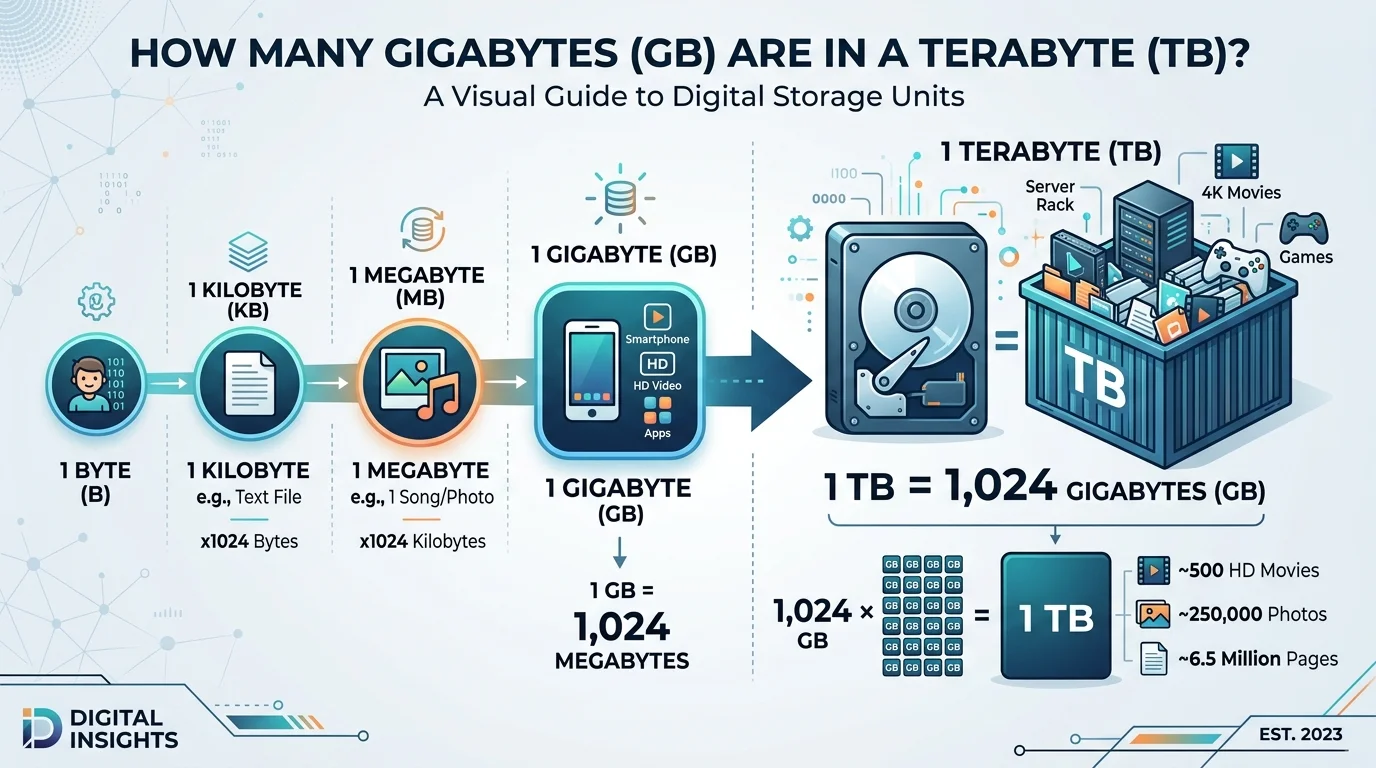
A terabyte (TB) equals 1,000 gigabytes (GB) under the decimal system used by manufacturers, or 1,024 gigabytes under the binary system used by your operating system. Both numbers are technically correct they just come from two different counting methods. I'll break down exactly why below, and show you what it means How Many Gigabytes in Terabyte for your actual storage needs.
Let's dive in.
The Quick Answer (For Those Who Are Skimming)
I'll give you the short version first because I respect your time.
According to Teradata's glossary, one terabyte equals 1,000 gigabytes, or 1,000,000,000,000 bytes. That's the decimal system talking.
But flip over to how your computer actually reports storage, and you'll see a different number. GBMB's conversion breakdown explains that in binary terms, 1 TB is 2^40 bytes — which comes out to 1,024 GB.
So which one is "right"? Both. That's the annoying truth.
Why There Are Two Different Numbers
This confused me for years, so let me save you the headache.
Computers, deep down, think in binary — ones and zeros, powers of two. That's just how the hardware works. So technically, a gigabyte in binary storage is 1,073,741,824 bytes, not a clean billion.
Hard drive manufacturers, on the other hand, like round numbers. They use the decimal system — base 10 — because it's simpler to market and easier to calculate. Box explains this well: technically, 1TB amounts to 1,024GB, but the industry typically rounds down to simplify the advertised capacity.
This is exactly why you buy a "1TB" drive, plug it in, and your computer tells you it's actually closer to 931GB. You didn't get scammed. You just got caught in the middle of a decades-old binary vs. decimal disagreement.
The Two Systems, Side by Side
Here's the cheat sheet I wish someone had given me earlier:
System | Used By | 1 TB Equals |
|---|---|---|
Decimal (base-10) | Manufacturers, marketing | 1,000 GB |
Binary (base-2) | Operating systems (Windows, macOS) | 1,024 GB |
If you remember nothing else from this article, remember that table.
Full Storage Unit Comparison Table
Since a terabyte doesn't exist in isolation, here's how every unit stacks up — with real-world examples so the numbers actually mean something:
Unit | Approx. Size | Real-World Example |
|---|---|---|
Kilobyte (KB) | 1,000 bytes | A short text message |
Megabyte (MB) | 1,000 KB | One MP3 song (~4MB) |
Gigabyte (GB) | 1,000 MB | A 45-minute HD video |
Terabyte (TB) | 1,000 GB | ~500 hours of HD video |
Petabyte (PB) | 1,000 TB | Entire university's research data |
Exabyte (EB) | 1,000 PB | A significant chunk of internet traffic in a day |
What Does a Terabyte Actually Look Like?
Numbers are abstract. Let's make this real.
I love this analogy from Proton's blog on storage capacity: imagine a kilobyte is a sip of water, a gigabyte is a full glass, and a terabyte is an entire Olympic-sized swimming pool. That mental image alone should tell you just how massive a terabyte really is.
Still not convinced? Let's get practical.
According to Dropbox, 1 TB of storage is roughly equivalent to:
16 iPhones worth of storage (64GB models)
4 laptops (256GB models)
Around 1,000,000 megabytes, or 1,000 gigabytes in simple terms
So yeah. A terabyte isn't just "a lot" — it's genuinely enormous when you compare it against the devices you use every single day.
Step-by-Step: How to Convert GB to TB Yourself
You don't need a calculator app for this. Honestly, it's simpler than it sounds. Here's how I do it.
Step 1: Decide which system you need. Are you comparing marketing specs (decimal) or checking your actual operating system's storage report (binary)? This matters more than people think.
Step 2: Apply the right formula.
Decimal: divide your GB number by 1,000
Binary: divide your GB number by 1,024
Step 3: Double-check against your device. Open your file explorer or "About This Mac" / "This PC" window. Compare what it shows against your math. If there's a small gap, that's the binary-decimal discrepancy at work — not an error.
Step 4: Use an online converter if you're in a hurry. Tools like GBMB's calculator do this instantly, and they're genuinely handy when you're comparing multiple cloud storage plans or drives at once. If you're also cleaning up your digital workflow while you're at it, our free SEO tools roundup has some handy utilities worth bookmarking.
That's it. Four steps. You've now got this down better than most IT help desks.
How Many Photos, Movies, or Files Fit in a Terabyte?
This is the question that actually matters to most of you, I think — not the raw math, but what it means for your life.
Roughly speaking, 1TB of storage holds:
Photos: Around 200,000–250,000 smartphone photos (at typical 4-5MB file sizes)
Movies: Somewhere between 200 and 300 HD movies, or roughly 100-125 4K movies, depending on compression
Music: Upwards of 200,000 songs in standard MP3 quality
Documents: Millions of Word docs or PDFs, easily
If you're a photographer, a gamer with a large library, or someone who just hoards every file "just in case" (no judgment, I do it too), a terabyte gives you serious breathing room.
Terabyte vs. Other Storage Units (Where Does It Fit?)
I think it helps to zoom out and see the whole data storage hierarchy at once. Here's the ladder, from smallest to largest:
Bit – the smallest unit, just a 0 or 1
Byte – 8 bits
Kilobyte (KB) – roughly 1,000 bytes
Megabyte (MB) – roughly 1,000 KB
Gigabyte (GB) – roughly 1,000 MB
Terabyte (TB) – roughly 1,000 GB
Petabyte (PB) – roughly 1,000 TB
Exabyte (EB) – roughly 1,000 PB
Actian's glossary confirms this same climb, noting that one petabyte equals 1,024 terabytes in the binary system — so the pattern just keeps repeating as you go up.
Pretty wild when you think about how far this scale actually goes, right?
What Does a Terabyte of Cloud Storage Cost in 2026?
Here's an angle most guides skip. If you're comparing physical drives to cloud storage, pricing per terabyte typically runs somewhere between $2-$10/month depending on the provider and tier, with most consumer-grade plans (Dropbox, Google, iCloud, Proton) clustering in the $5-8/month range for 1-2TB. Physical external drives, by contrast, are a one-time cost — usually more cost-effective long term if you don't need automatic sync or offsite backup.
So, How Much Storage Do You Actually Need?
Here's my honest take, and I say this as someone who's bought (and regretted) both too little and too much storage over the years.
If you're a casual user — browsing, emailing, streaming — 256GB to 512GB is plenty.
If you're managing large media files, running a small business, or backing up multiple devices, a terabyte drive starts making a lot more sense. It's the sweet spot between "way more than I need" and "I'll run out in six months." And if storage costs matter to your budget planning, our guide on calculating payback period and ROI can help you think through whether cloud or physical storage makes more financial sense long-term.
And if you're dealing with serious datasets, video production, or long-term archiving? You're realistically looking at multiple terabytes, or a proper NAS (network-attached storage) setup.
Frequently Asked Questions
Is 1TB the same as 1000GB?
Not exactly. 1TB equals 1,000GB under the decimal system (used by manufacturers), but 1,024GB under the binary system (used by your operating system). Both are correct depending on context.
Why does my 1TB drive show less than 1TB of space?
Your operating system uses binary calculation (1,024GB = 1TB), while the drive was marketed using decimal calculation (1,000GB = 1TB). The "missing" space isn't lost — it's just measured differently.
How many 4K movies fit in a terabyte?
Roughly 100-125 4K movies, depending on runtime and compression, since 4K files average around 7-10GB per movie.
Is a terabyte bigger than a gigabyte?
Yes. A terabyte is 1,000 (or 1,024) times larger than a gigabyte.
What's bigger than a terabyte?
A petabyte is next, equal to roughly 1,000 terabytes, followed by an exabyte, zettabyte, and yottabyte.
Wrapping This Up
At the end of the day, whether a terabyte is 1,000 GB or 1,024 GB depends entirely on context — marketing versus math. Both numbers are "correct." Neither is lying to you. It's just two different counting systems that never quite agreed to sync up.
Now that you know the difference, you'll never get confused by a storage listing again. And honestly? That's a small win, but a satisfying one.
🔥 Limited Time Deal
NewGet lifetime access to Postunreel with a one-time payment. Never pay again!
Your Go-To Solution for Stunning Carousels using AI!
Postunreel is a free AI carousel generator tool that helps you design captivating carousel posts for LinkedIn, Instagram, and other platforms. It makes it easier to increase social media engagement and grow your audience.
Create Free Carousel Now 🚀Related Blogs
How to Improve Focus in Photos: 11 Fixes
Blurry photos? Learn how to improve focus in photos with 11 proven fixes, from autofocus modes to focus stacking. Get sharper shots.
Generate Custom Infographic Illustrations for Complex Ideas
Learn how to create AI infographic illustrations with Dreamina. Turn complex ideas into clear, engaging visuals for presentations, reports, and blogs.
Black and White Filter: Color to Use & Why (2026)
Flat B&W photos? A black and white filter fixes that. See which color to buy first, how to use it, and how to get the look in Lightroom.