What Is an IT Managed Service Provider? 2026 Guide
Wondering if an IT managed service provider is worth it? Compare costs, pricing models, MSP vs MSSP, and 6 steps to choosing right partner.
An IT managed service provider (MSP) is a third-party partner that manages defined IT functions — security, cloud, endpoints, network, and help desk — under a service level agreement for a predictable monthly fee. It replaces reactive break-fix repairs with continuous, proactive monitoring.
Key Takeaways
The global managed service provider market sits between $370 billion and $460 billion in 2026, depending on how analysts define the category.
Gartner forecasts worldwide IT spending above $6.31 trillion in 2026, with IT services the largest slice at over $1.87 trillion.
51% of small and midsize businesses already use an MSP, rising to 62% of midsize firms.
Managed security services is both the largest segment (≈31% share) and the fastest-growing (≈18% annually).
CISA and Five Eyes agencies warn that MSPs are deliberately targeted as launch pads into customer networks — vendor due diligence is mandatory, not optional.
Now let me be blunt with you.
Most businesses don't fire their IT managed service provider over price. They fire them because nobody answered the phone at 2 a.m. when the servers went dark.
I've spent months inside Gartner forecasts, CISA advisories, and market reports that contradict each other by hundreds of billions of dollars.
Here's what I found: the managed services model works beautifully — but only if you know how to buy it.
This guide shows you exactly how.
What an IT Managed Service Provider Actually Does
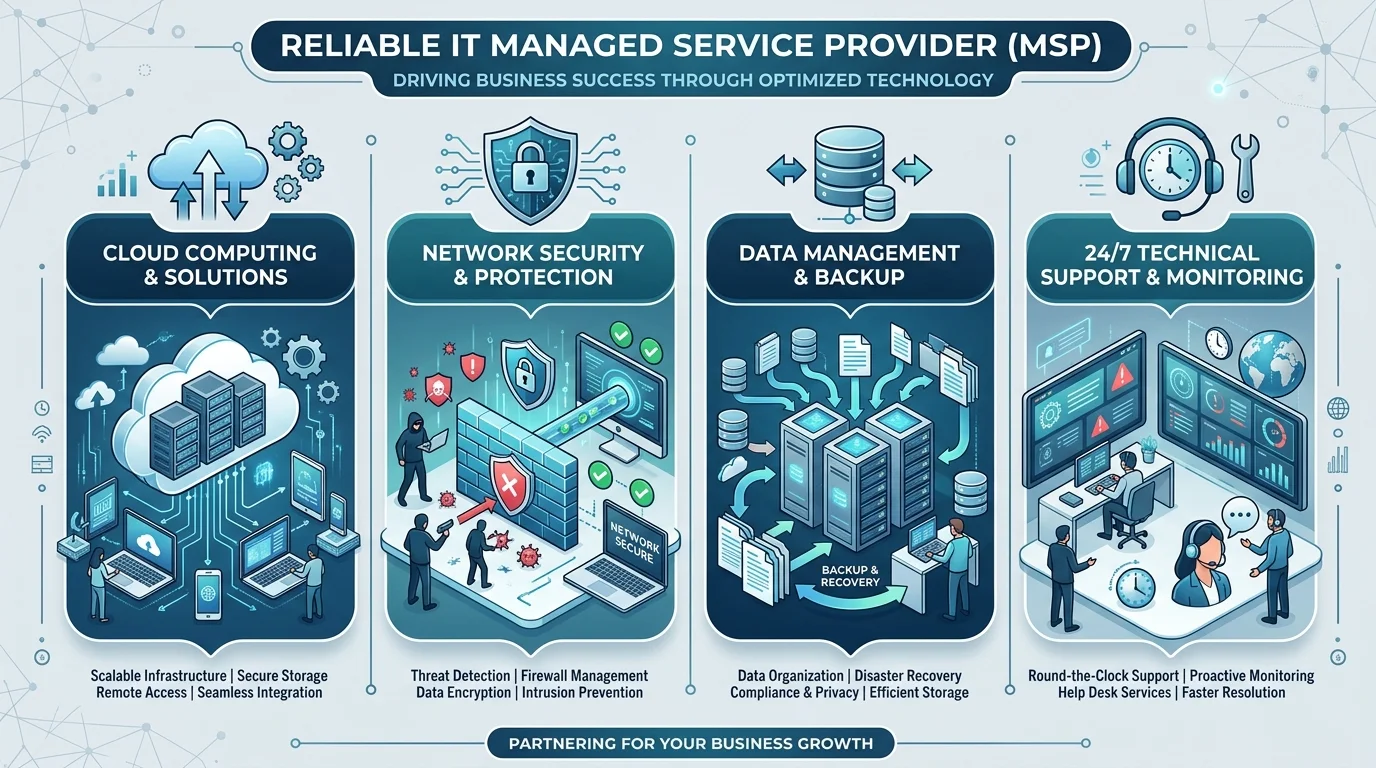
An IT managed service provider takes ownership of specific IT infrastructure management functions under a written service level agreement (SLA), billed as a predictable monthly subscription. It is not a repair shop and not a contractor you call when things explode. It is a continuous operator of your technology stack. That distinction — proactive versus reactive — is the entire ballgame, and it's where most buyers get confused before they've even requested a quote.
So what lands inside the contract?
Typically, you're looking at:
Remote monitoring and management (RMM) across servers and endpoints
Help desk support and service desk ticketing, often 24/7/365
Patch management and endpoint management
Managed backup and disaster recovery
Managed cloud services and managed network services
Managed security services, sometimes delivered through a specialist partner
Honestly? Scope varies wildly between providers. Which is why Step 1 of my framework below matters so much.
Worth noting: the ticket-handling layer is changing fast. A growing share of providers now lean on automation and machine learning to triage first-line requests, and I've broken down that shift in my guide to AI-powered IT support companies if you want to see which vendors are actually delivering on it.
Managed Services vs. Break-Fix: The Comparison Nobody Explains Properly
You need to understand this trade-off deeply, because it drives every dollar you'll spend. The break-fix model charges you hourly when something fails, which looks cheaper on paper and rarely is. Under break-fix you pay for downtime twice — once to the technician, once in lost productivity — and no SLA holds anyone accountable for how long that takes. Proactive monitoring flips the equation by catching failures before they become incidents.
Here's the honest version:
Factor | Break-Fix | Managed Services |
|---|---|---|
Billing | Hourly, unpredictable | Flat monthly, budgetable |
Response | Reactive, after failure | Continuous, pre-emptive |
Security | Bolted on per visit | Built into the contract |
Scalability | Breaks down as you grow | Scales with headcount |
Accountability | None | SLA-backed with penalties |
Break-fix still makes sense for a five-person startup with two laptops. For everyone else, break-fix is a slow leak that shows up as downtime rather than as an invoice line.
MSP vs. MSSP vs. In-House IT: Which Model Fits You?
Buyers conflate these three constantly, and the confusion costs real money. An MSP manages your broad IT estate. An MSSP (managed security services provider) goes deeper on cybersecurity alone — MDR, XDR, threat hunting, SOC operations. An in-house team gives you maximum control and maximum fixed cost. Regulated industries frequently run an MSP and an MSSP together, because general IT management and specialist security operations are genuinely different disciplines.
Factor | MSP | MSSP | In-House IT |
|---|---|---|---|
Primary focus | Full IT operations | Cybersecurity only | Whatever you staff for |
Cost structure | Monthly subscription | Monthly subscription | Salaries + tools + benefits |
Security depth | Baseline to strong | Deep, SOC-grade | Depends entirely on hires |
Coverage | Often 24/7 | 24/7 SOC standard | Business hours typically |
Best fit | SMB to mid-market | Regulated / high-risk | Large enterprise |
The Numbers: Why This Market Exploded (And Why Estimates Disagree)
Analyst firms define this category differently, so managed service provider market size figures range from roughly $370 billion to over $460 billion for 2026. That isn't sloppiness — it's methodology. Some reports include application managed services, others fold cloud subscriptions into the total, and others weight SMB packages heavily. Anyone quoting you a single confident number without naming their source is selling something. Here are the figures that hold up under scrutiny.
Gartner puts worldwide IT spending above $6.31 trillion in 2026, with IT services — including managed services and IaaS — the largest single category at more than $1.87 trillion.
MarketsandMarkets forecasts growth to $705 billion by 2031 at an 8.9% CAGR.
North America commands roughly 32%–43% of global revenue, per Fortune Business Insights.
Adoption is now mainstream — CloudSecureTech's analysis found 51% of small and midsize businesses use an MSP, climbing to 62% of midsize firms.
You are not early anymore. You are catching up.
Security Is Now the Main Event
Something shifted in this market, and not enough buyers have noticed. Managed security services is simultaneously the largest segment at roughly 31% share and the fastest-growing at roughly 18% annually. Clients have stopped buying antivirus licences and started buying outcomes: detection, response, resilience. That single change explains why MDR (managed detection and response) and XDR (extended detection and response) dominate every serious MSP conversation in 2026.
The risk math backs this up.
IBM's Cost of a Data Breach Report shows global average breach costs hitting a record high in 2026, up 12% year over year, driven by detection, escalation, and lost business costs.
Supply-chain compromise accounted for nearly 15% of all attack vectors in the 2025 edition.
Which brings us somewhere uncomfortable.
Your MSP Is Also a Risk — Handle It Properly
I'd be doing you a disservice if I skipped this part. CISA, the NSA, the FBI, and Five Eyes partners issued a joint advisory warning that threat actors deliberately target managed service providers as launch pads into customer networks. Australia's ACSC stated it plainly: MSPs are vital to many businesses and therefore a major target. Third-party risk and supply chain risk management are procurement basics here, not paranoia.
So insist on all four of these:
Documented zero trust architecture with multi-factor authentication on every admin account
A written incident response plan naming your specific escalation contacts
Full transparency on exactly which systems and data their technicians can reach
Independent attestation — SOC 2, HIPAA, or GDPR compliance as your industry demands
CISA's ICT Supply Chain Risk Management library is free. Use it as your checklist.
How to Choose an IT Managed Service Provider: A 6-Step Framework
Choosing an outsourced IT partner is a risk-transfer decision, not a vendor bake-off. Your goal is the lowest total cost of ownership once you account for downtime, breach exposure, compliance fines, and the productivity your team loses waiting on tickets — not the lowest monthly invoice. Follow these six steps in order and you'll avoid the mistakes that force companies to re-tender within eighteen months.
Step 1: Define your scope before you contact anyone. Write down what needs managing. Endpoints? Cloud? Security? Everything? Vague scope produces vague quotes and inevitable change orders.
Step 2: Decide between fully managed and co-managed IT. Have internal staff? Co-managed IT augments them rather than replacing them. It's the fastest-growing arrangement I see, and it protects institutional knowledge you can't buy back.
Step 3: Understand the pricing model, not just the price. Four models dominate. Compare them properly:
Model | How it works | Best fit for | Watch out for |
|---|---|---|---|
Per-user pricing | Flat fee per employee, covers all their devices | People-heavy teams, hybrid work | Costs jump with hiring sprees |
Per-device pricing | Fee per server, workstation, or network device | Infrastructure-heavy operations | Device sprawl inflates the bill |
Tiered pricing | Bronze/silver/gold service bundles | Buyers who want simple choices | Key services hidden in the top tier |
All-inclusive flat fee | One price, everything in scope | Predictability-focused finance teams | Read the exclusions list twice |
The cheapest headline rate is almost never the lowest real cost.
Step 4: Interrogate the SLA line by line. Response time versus resolution time. Coverage hours. Financial penalties. Escalation paths. If it isn't written down, it doesn't exist.
Step 5: Run genuine security due diligence. Use the CISA framework above, then go a layer deeper on whatever they'll be hosting for you. Running a proper cloud security assessment before signing tells you whether their managed cloud services actually hold up under scrutiny — or whether you're inheriting someone else's misconfigurations. Ask directly about their own breach history, too. A confident provider won't flinch at that question.
Step 6: Test the onboarding plan. Ask for a documented 30/60/90-day MSP onboarding process. Providers who improvise onboarding improvise everything else.
7 Red Flags to Walk Away From
Some warning signs are worth more than any reference call. Watch for these during evaluation, because each one predicts a specific failure mode you'll experience six months into the contract. I've seen every single one of these play out.
No named account manager or single point of accountability
SLA with response times but no resolution commitments
Refusal to share a sample monthly reporting pack
Auto-renewal clauses longer than 12 months with no exit ramp
Vague answers about which subcontractors touch your data
No documented business continuity or backup testing schedule
Pricing that undercuts every competitor by 40% or more
What MSP Onboarding Should Look Like: 30/60/90 Days
Onboarding is where most MSP relationships quietly succeed or fail, yet almost nobody scores providers on it. A structured transition means your environment is documented, secured, and monitored before the first real incident lands. Ask any shortlisted provider to map their plan against this timeline — the good ones already have one written down.
Days 1–30: Full asset discovery, network documentation, RMM agent deployment, credential handover and rotation, baseline security assessment.
Days 31–60: Patch remediation of the backlog, backup validation and test restore, ticketing workflows live, first monthly report delivered.
Days 61–90: SLA performance review, security gap remediation, 12-month technology roadmap presented, quarterly business review scheduled.
Frequently Asked Questions
How much does an IT managed service provider cost?
Pricing depends on scope, headcount, and SLA tier, so no honest provider quotes a flat number upfront. What you can pin down is the model — per-user, per-device, tiered, or all-inclusive. Compare total cost of ownership including downtime and breach risk, not the monthly line item alone.
What is the difference between an MSP and an MSSP?
An MSP manages your broad IT environment: networks, cloud, endpoints, and help desk. An MSSP specialises exclusively in cybersecurity, running SOC operations, MDR, and threat hunting. Regulated or high-risk businesses often engage both, since general IT operations and security operations are distinct disciplines.
Is co-managed IT right for my business?
Co-managed IT fits when you already have internal staff you want to keep. The provider absorbs labour-intensive backend work — patching, backups, tier-one tickets — so your team focuses on strategy and internal projects. It acts as a force multiplier rather than a replacement.
How long does MSP onboarding take?
Expect 30 to 90 days for a full transition, depending on environment complexity and documentation quality. Discovery and monitoring deployment usually complete within the first month; security remediation and roadmap delivery extend through day 90.
Can I switch managed service providers mid-contract?
That depends entirely on your termination clause. Review notice periods, early-exit fees, and — critically — data and documentation handover obligations before you sign anything. Providers who resist writing exit terms into the contract are telling you something important.
Are managed service providers a security risk themselves?
Yes, and you should plan for it. CISA and international cyber authorities have documented threat actors targeting MSPs specifically to reach their customers' networks. Mitigate it with zero trust access controls, MFA on all admin accounts, documented incident response, and independent compliance attestation.
Ready to Make the Move?
Here's my straight recommendation. If your team is firefighting instead of building, if your business continuity plan is a hope and a spreadsheet, if you're one ransomware email away from a very bad quarter — stop deliberating. The right managed IT services provider delivers enterprise-grade proactive monitoring, round-the-clock coverage, and predictable IT budgeting for less than the loaded cost of a single senior hire. That's not a pitch. That's arithmetic.
Book the discovery call. Bring the six questions above and the red-flag list.
You'll know within thirty minutes whether they're the right partner — and that clarity alone is worth the meeting.
About the Author

Nathan Cole
Nathan Cole is a SaaS writer and AI product reviewer at Postunreel with a sharp focus on evaluating AI-powered tools for content creators, marketers, and growing businesses. He holds a degree in Computer Science and brings over five years of experience writing about software products, productivity tools, and marketing technology. Nathan approaches every review with rigorous hands-on testing, clear comparison frameworks, and an honest perspective that cuts through marketing hype. His goal is to help Postunreel readers make smarter decisions about the tools they invest in so they can build better content workflows without wasting time or money.
🔥 Limited Time Deal
NewGet lifetime access to Postunreel with a one-time payment. Never pay again!
Your Go-To Solution for Stunning Carousels using AI!
Postunreel is a free AI carousel generator tool that helps you design captivating carousel posts for LinkedIn, Instagram, and other platforms. It makes it easier to increase social media engagement and grow your audience.
Create Free Carousel Now 🚀Related Blogs
How to Clear Cache in Chrome: Step by Step Guide
Learn how to clear cache in Chrome on desktop, Android and iPhone. Follow our simple steps, try a hard reload, and fix stale pages in under a minute.
URL Encoder and Decoder SpellMistake: Fix Broken Links and Encoding Errors (2026 Guide)
Learn how a URL encoder and decoder fixes broken links, %20 errors and double encoding. Follow the step by step guide, then try SpellMistake today.
SQL Server Management Studio (SSMS): The 2026 Guide
Learn what SQL Server Management Studio is, what's new in SSMS 22, and how to install it step by step. Free download, system requirements, and FAQs.