Coaxial Cable for Internet: RG6 vs RG59 Guide
Coaxial Cable for Internet: RG6 or RG59? See signal-loss data, DOCSIS speed limits, and guide to faster, more stable coax internet at home.
Your Coaxial Cable for Internet type matters a lot for internet speed. RG6 cable is the modern standard — it handles higher frequencies with far less signal loss than older RG59 cable, and combined with a DOCSIS 3.1 or 4.0 modem, it's the difference between a laggy connection and a stable, fast one. Below, I'll show you exactly why, with real numbers.
I've spent way too many hours troubleshooting slow internet speeds, and here's what I found out: 90% of the time, it's not your ISP's fault. It's your coaxial cable.
Yep. That thin little wire snaking behind your TV stand might be the reason your Netflix buffers at the worst possible moment.
In this guide, I'm going to break down exactly how coax cable internet works, why the cable type you use matters way more than you think, and how to pick the right one so you never deal with a laggy connection again.
Let's get into it.
What Is Coaxial Cable, Anyway?
Quick refresher before we go deeper.
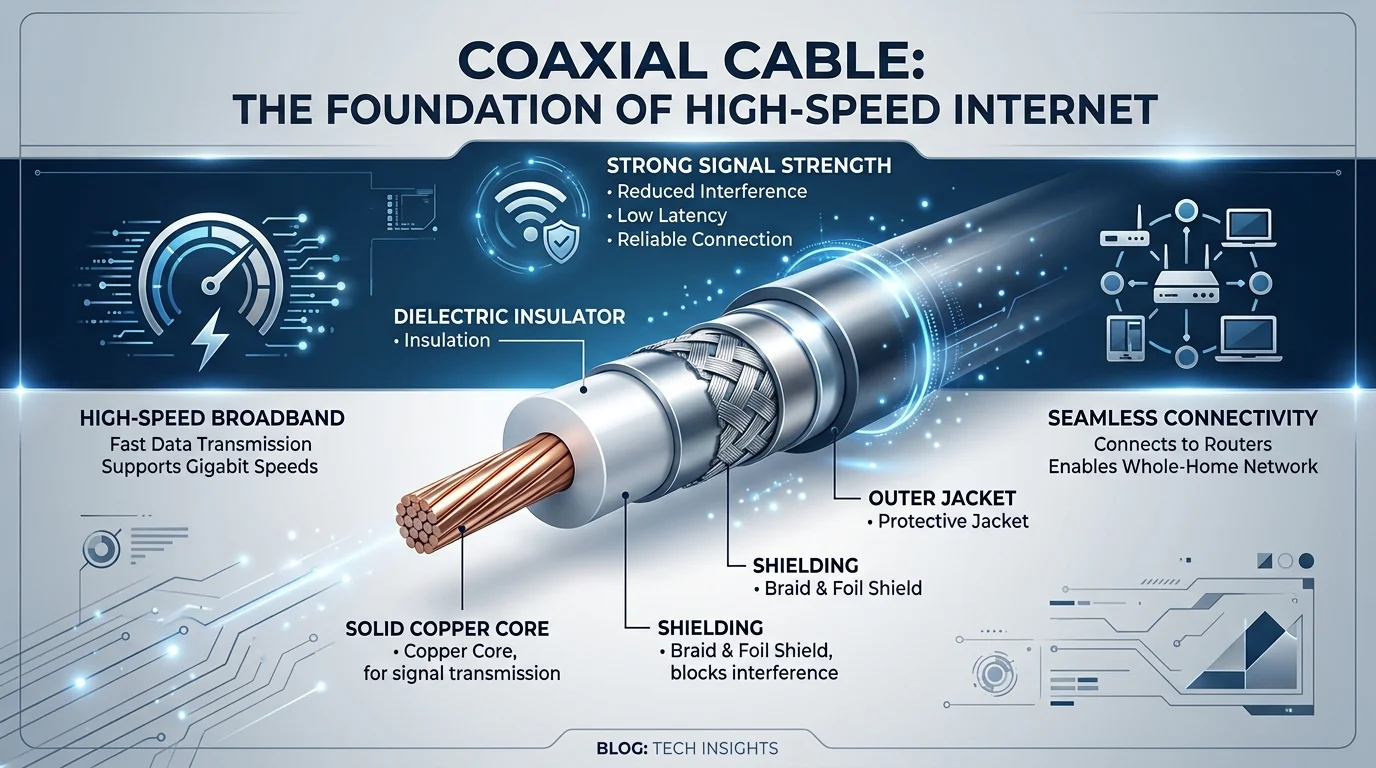
A coaxial cable is a type of wire built with a center conductor, a layer of dielectric insulation, a metallic shielding layer, and a protective outer jacket. This layered design is what allows it to carry high-frequency signals over long distances without losing much quality along the way.
Originally, this cable was made for cable TV. But somewhere along the way, providers realized they could piggyback internet data onto the same wire. That's a genius move, honestly — and it's the whole reason cable internet exists today.
How Does Coax Deliver Internet, Exactly?
So here's the deal.
Your internet doesn't just "appear" on your coax line. It travels through a whole system called DOCSIS — short for Data Over Cable Service Interface Specification. According to CableLabs, the organization that actually created and maintains the standard, DOCSIS governs how your modem and your provider's equipment "speak" to each other over the same wire that once carried only TV signals.
Think of DOCSIS as the translator between your modem and your provider's equipment. Without it, your modem would just be sitting there confused, staring at raw radio-frequency signals with no idea what to do with them.
Here's the simplified path your data takes:
Your ISP sends data through fiber optic lines to a neighborhood node
That node converts the signal from light (fiber) to electrical RF signal (coax)
The signal travels through coax to your home
Your cable modem decodes it and hands it off to your router
Your router shares it with all your devices
This whole setup — part fiber, part coax — is called a hybrid fiber-coaxial network, or HFC network for short. Once that signal reaches your router, you'll also want your Wi-Fi locked down properly — here's how to change your WiFi password if you haven't updated it in a while.
Why the Type of Coax Cable You Use Actually Matters
Here's where most people mess up.
They assume "coax is coax." Any cable will do, right?
Wrong. Dead wrong, actually.
There are a few different types of coax out there, but the two you'll run into most are RG6 and RG59. And the difference between them isn't small — it can seriously throttle your speeds if you pick the wrong one.
RG6 vs. RG59: The Real Breakdown
I want to be blunt with you here.
If you're setting up internet, you want RG6. Full stop.
RG6 uses a thicker 18 AWG copper conductor, better dual shielding (usually foil plus braid), and thicker dielectric insulation. All of that adds up to way less signal attenuation — meaning less signal loss over distance.
Here's the comparison laid out so you can see it at a glance:
Feature | RG6 | RG59 |
|---|---|---|
Center conductor | 18 AWG (thicker) | 20 AWG (thinner) |
Shielding | Foil + braid (dual) | Braid only |
Signal loss @ 100 MHz | ~2.3 dB/100 ft | ~3.4 dB/100 ft |
Signal loss @ 1 GHz | ~6–7 dB/100 ft | ~11–12 dB/100 ft |
Impedance | 75 ohm | 75 ohm |
Best for | Internet, satellite, HDTV | Short analog/CCTV runs |
Recommended for cable internet? | Yes | Not recommended |
That gap at 1 GHz is the one that matters most, since modern DOCSIS signals live up near that range. And if your cable run is long — say, from your basement to an upstairs bedroom — that signal loss compounds fast.
Quick anecdote: when I swapped a 15-year-old RG59 run in my own hallway for RG6, my modem's signal-to-noise ratio jumped noticeably, and a handful of intermittent dropouts disappeared entirely. It's a small, boring fix — but it works.
Bottom line? RG6 coaxial cable is the modern standard for a reason. It handles higher frequencies, supports faster speeds, and keeps your connection stable even over longer distances.
DOCSIS Versions: Why Your Modem Matters Just as Much as Your Cable
Now, here's something a lot of guides skip over.
Even if you have the best RG6 cable money can buy, your speeds are still capped by your modem's DOCSIS version.
Let me explain.
DOCSIS 3.0 — the older standard, typically maxing out around 1 Gbps downstream
DOCSIS 3.1 — a big jump, supporting multi-gig speeds
DOCSIS 4.0 — the newest standard, and this one's a beast. It supports up to 10 Gbps downstream and 6 Gbps upstream, which basically closes the gap between cable and fiber internet
So if you're rocking premium RG6 cable but plugging it into an ancient modem, you're leaving speed on the table. You need both pieces working together.
Step-by-Step: How to Set Up Coax Internet the Right Way
Alright, let's make this actionable. Here's exactly what I'd do if I were setting this up in my own home.
Step 1: Check your existing coax outlets Walk around your home and find where your coax wall outlets are. This tells you where your modem can realistically go.
Step 2: Upgrade to RG6 cable If your home still has old RG59 lying around (common in older houses), swap it out. This single change can noticeably improve your speed and stability.
Step 3: Minimize splitters Every splitter you add introduces signal loss. Use as few as possible, and if you need one, get a high-quality one rated for at least 1 GHz.
Step 4: Match your modem to your plan If you're paying for gigabit speeds, make sure your modem supports DOCSIS 3.1 or higher. Otherwise, you're paying for speed you'll never actually see.
Step 5: Keep cable runs short and clean Avoid unnecessary bends, kinks, or excessively long runs. Every extra foot adds attenuation. Once your connection is solid, you can share your WiFi password with everyone in the house without worrying about a weak signal ruining the experience.
Frequently Asked Questions
Can I use RG59 for internet?
Technically yes, but it's not recommended. RG59's thinner conductor and single-layer shielding cause much higher signal loss at the frequencies modern DOCSIS internet uses, which can lead to slower or less stable speeds — especially over longer runs.
Does coax cable length affect internet speed?
Yes. Signal loss (attenuation) increases with distance. A 100-foot RG6 run loses far less signal than the same length of RG59, but even RG6 will show some degradation on very long runs, so keeping cable paths as short and direct as possible helps.
How do I know if my coax cable is RG6?
Check the print along the cable jacket — most manufacturers label it directly as "RG6" or "RG-6." You can also compare thickness: RG6 is noticeably thicker than RG59.
Do splitters slow down internet speed?
Yes, every splitter introduces some signal loss. Using fewer, higher-quality splitters rated for at least 1 GHz minimizes the impact on your speeds.
Is coax internet as fast as fiber?
With DOCSIS 4.0, coax can now technically match fiber's top speeds (up to 10 Gbps downstream), but fiber generally offers more consistent symmetrical speeds and lower latency in practice.
Is Upgrading Your Coax Cable Worth It in 2026?
Honestly? Yes. Without a doubt.
If you're still running RG59 or ancient, unshielded coax through your walls, you're capping your own internet speed before it even reaches your router. That's like buying a sports car and putting bicycle tires on it.
Upgrading to a properly shielded RG6 cable is one of the cheapest, easiest fixes you can make to your home network. We're talking a small one-time cost for a noticeably faster, more stable connection — especially if you've got multiple people streaming, gaming, or working from home at once.
I'll be straight with you: this isn't some flashy, complicated fix. It's boring, unglamorous cable work. But it works.
If your internet has been randomly dropping or slowing down for no clear reason, don't call your ISP first. Check your coax setup first. There's a good chance that's your real bottleneck — and it's one you can fix yourself, today, for less than the cost of a nice dinner out.
About the Author

Nathan Cole
Nathan Cole is a SaaS writer and AI product reviewer at Postunreel with a sharp focus on evaluating AI-powered tools for content creators, marketers, and growing businesses. He holds a degree in Computer Science and brings over five years of experience writing about software products, productivity tools, and marketing technology. Nathan approaches every review with rigorous hands-on testing, clear comparison frameworks, and an honest perspective that cuts through marketing hype. His goal is to help Postunreel readers make smarter decisions about the tools they invest in so they can build better content workflows without wasting time or money.
🔥 Limited Time Deal
NewGet lifetime access to Postunreel with a one-time payment. Never pay again!
Your Go-To Solution for Stunning Carousels using AI!
Postunreel is a free AI carousel generator tool that helps you design captivating carousel posts for LinkedIn, Instagram, and other platforms. It makes it easier to increase social media engagement and grow your audience.
Create Free Carousel Now 🚀Related Blogs
How to Use Google Lens: Guide for Android, iPhone, and Desktop (2026)
Learn how to use Google Lens on Android, iPhone, and desktop. Follow simple steps to translate text, shop, and search with your camera in just minutes.
Report a Problem Apple: How to Request a Refund (2026 Guide)
Use Report a Problem Apple to request a refund in minutes. Follow the simple steps, track your status, and avoid fake support scams. Updated 2026.
Internet Options by Address: How to Find the Best Provider at Your Door
Find internet options by address in 3 simple steps. Check fiber, cable and 5G providers, spot map errors, and pick the right plan for your home today.