Internet Options by Address: How to Find the Best Provider at Your Door
Find internet options by address in 3 simple steps. Check fiber, cable and 5G providers, spot map errors, and pick the right plan for your home today.
Your address decides which internet providers can serve you. To see your internet options by address, enter your address into the FCC National Broadband Map, cross check with a comparison site, then confirm with the provider before you sign up.
Here's the deal.
Two houses on the same street can have totally different options. One gets fiber. The other is stuck on slow DSL.
I've seen people sign up for a plan and then learn it wasn't offered at their home. Painful.
So let's fix that.
Why Your Address Decides Everything
Providers build networks street by street, not city by city. That means your service address controls which internet service providers (ISPs) can reach you. A zip code search is a rough guess. An exact address check is the real answer, and it saves you from wasting time on plans you can't get.
Think of a cable company that wires one block and skips the next.
Or a new apartment complex that gets fiber while older homes nearby don't.
That's why internet availability changes so much from door to door. An address based provider search shows what actually reaches you.
And the gap is real. Pew Research found about eight in ten U.S. adults subscribe to home broadband. In its 2025 survey, rural adoption was 71%, versus 84% in suburbs.
Know Your Connection Types Before You Compare
Before comparing plans, you need to know what's under the hood. Every home internet plan runs on one of a few technologies, and each behaves differently. Speed, reliability and price all follow from it. Here's a quick table so the search results make sense.
Connection type | How it reaches you | Main strength | Main drawback |
|---|---|---|---|
Fiber internet | Fiber optic cable | Fastest, usually symmetrical upload and download speeds | Limited availability |
Cable internet | Coaxial TV cable | Wide availability, solid speeds | Slower uploads |
DSL internet | Copper phone lines | Often cheap, widely present | Usually the slowest wired option |
Fixed wireless and 5G home internet | Signal from a nearby tower | Helps where cable and fiber don't reach | Line of sight and weather limits |
Satellite internet | Dish to orbiting satellites | Reaches remote areas | Higher price, more latency |
Cable plans run on coaxial wiring. If you want to understand the wiring in your walls, read our coaxial cable for internet guide (RG6 vs RG59).
Honestly, if fiber or cable shows up at your address, start there. HighSpeedInternet.com recommends fiber or fixed wireless over older options in most cases.
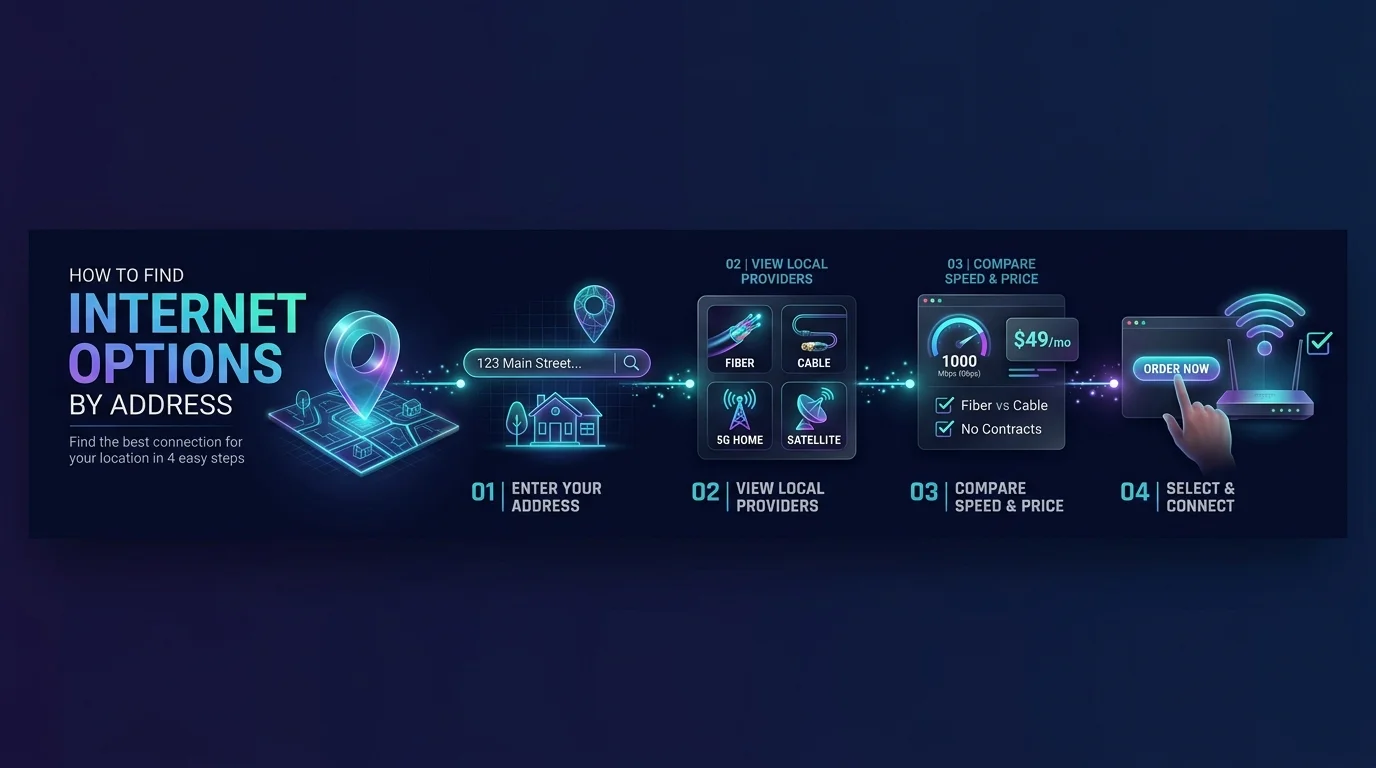
Step by Step: How to Check Internet Providers at Your Address
Ready? This takes about ten minutes. Follow the three steps in order and you'll know which ISPs serve your home, what speeds they advertise, and which plan deserves your money. Skipping a step is how people end up paying for service they can't use.
Step 1: Search the FCC National Broadband Map
Start with the free government tool. It displays availability as reported by ISPs under the FCC's Broadband Data Collection. It gives you an official baseline before you read any sales page.
Open the map and type your address into the search bar.
No street address? Enter a town and state instead.
Click your location dot. You'll see each provider, its technology and its maximum advertised speeds.
Step 2: Cross Check With a Comparison Site
One source never tells the whole story. A second tool catches gaps, small local providers and current plans and pricing. Think of it as double checking before you spend money.
Try an address based tool like ISP Reports, which also lists smaller regional providers.
Write down every option. Note the speed, the monthly price and whether there's a contract.
Step 3: Confirm Directly With the Provider
Now the most important move. Go to the provider's own site and enter your address there. Confirm the plan, the final price and the installation fee. Comparison pages can lag behind network changes, so this two minute check protects you from surprises.
Also ask about data caps, equipment rental and promo pricing that expires after a year.
Why the Broadband Map Isn't Perfect
I like the FCC map, but I won't pretend it's flawless. These tools show what providers say they can offer, not what you'll experience. Knowing the limits helps you ask smarter questions, and keeps you from paying for speed you'll never see.
Here's the catch.
The map shows maximum advertised speeds, which may not match real speeds. Also, its data isn't real time: the underlying FCC data updates about every six months.
Researchers at UC Santa Barbara compared advertised and measured speeds. Areas advertising over 1 Gbps averaged only about 300 Mbps in tests.
There's also a debate about provider reporting. A former FCC official has said providers can overstate their reach.
Why does it matter? Because that data decides which areas qualify for the $42.5 billion BEAD program and other broadband funding.
If the map is wrong about your home, you can file a challenge. Upload screenshots or emails from a provider saying service isn't available.
How Much Speed Do You Actually Need?
Speed is where people overpay or underbuy. The right number depends on how many people and devices share your connection. I'll give you a simple rule so you can match a plan to your household, with no guesswork and no gigabit you won't use.
As of its 2024 report, the FCC defines fixed broadband as 100 Mbps down and 20 Mbps up, up from the old 25/3 standard. Its Section 706 Report says roughly 24 million Americans lacked that level of service, mostly in rural and Tribal areas.
So treat 100/20 as your floor.
Working from home, gaming or streaming in 4K? Aim higher. If upload speed matters, fiber is hard to beat.
How to Save Money on Your Plan
Finding a provider is half the battle. Paying a fair price is the other half. A couple of tools can lower your bill, and small savings add up fast over a year.
First, look for the FCC's broadband labels. They work like a nutrition label, showing the price, typical speeds and policies at the point of sale.
Second, check the Lifeline program. It offers eligible households up to $9.25 off monthly on internet or phone service. Apply at lifelinesupport.org.
Frequently Asked Questions
Here are quick answers to the questions people ask most about internet options by address. Each one is short on purpose, so you can scan and move on. If your situation is unusual, start with the steps above and then come back here.
How do I find internet providers at my address?
Enter your address into the FCC National Broadband Map, then verify on a comparison site and the provider's own website. Using all three catches errors that any single tool might miss.
Is the FCC National Broadband Map accurate?
It's a good starting point, but not perfect. It shows provider reported, maximum advertised speeds, which can differ from real speeds. You can challenge wrong information on the map.
What if no providers show up at my address?
Check the map's location data first, since your address may be missing or misplaced. Then look at fixed wireless, 5G home internet or satellite, which can reach places wired networks don't.
Which internet type is best?
Fiber usually wins on speed and reliability, with cable a strong second. If neither is available, fixed wireless or 5G home internet is often the next best choice.
How fast should my home internet be?
The FCC's 2024 benchmark is 100 Mbps down and 20 Mbps up. Heavy users, like remote workers and gamers, should aim higher.
Your Next Move
You now know more than most people who shop for internet. You understand why your address matters, how to read the broadband map, and which connection type fits you.
So don't wait.
Enter your address today and see your internet options by address. If fiber internet shows up, grab it. You'll get faster uploads, steadier performance and a plan you won't outgrow next year. If not, a solid cable or 5G home internet plan will still serve you well.
Once your new service is live, lock down your network. Learn how to change your Wi-Fi password, and how to share your Wi-Fi password with guests without handing over the keys to your whole network.
Check your address, compare your options, and sign up for the best plan you find.
About the Author

Nathan Cole
Nathan Cole is a SaaS writer and AI product reviewer at Postunreel with a sharp focus on evaluating AI-powered tools for content creators, marketers, and growing businesses. He holds a degree in Computer Science and brings over five years of experience writing about software products, productivity tools, and marketing technology. Nathan approaches every review with rigorous hands-on testing, clear comparison frameworks, and an honest perspective that cuts through marketing hype. His goal is to help Postunreel readers make smarter decisions about the tools they invest in so they can build better content workflows without wasting time or money.
🔥 Limited Time Deal
NewGet lifetime access to Postunreel with a one-time payment. Never pay again!
Your Go-To Solution for Stunning Carousels using AI!
Postunreel is a free AI carousel generator tool that helps you design captivating carousel posts for LinkedIn, Instagram, and other platforms. It makes it easier to increase social media engagement and grow your audience.
Create Free Carousel Now 🚀Related Blogs
How to Clear Cache in Chrome: Step by Step Guide
Learn how to clear cache in Chrome on desktop, Android and iPhone. Follow our simple steps, try a hard reload, and fix stale pages in under a minute.
URL Encoder and Decoder SpellMistake: Fix Broken Links and Encoding Errors (2026 Guide)
Learn how a URL encoder and decoder fixes broken links, %20 errors and double encoding. Follow the step by step guide, then try SpellMistake today.