What is an Email Address? Full Structure Guide
What is an email address? Learn its structure, how it works, and how to validate one clear, no-jargon guide with examples.
I've spent years knee-deep in SEO and content marketing, and you'd be shocked how many people can't actually explain what is an email address is — beyond "it's the thing with the @ symbol." So today, I'm breaking it down for you. Completely. No jargon. Just straight talk.
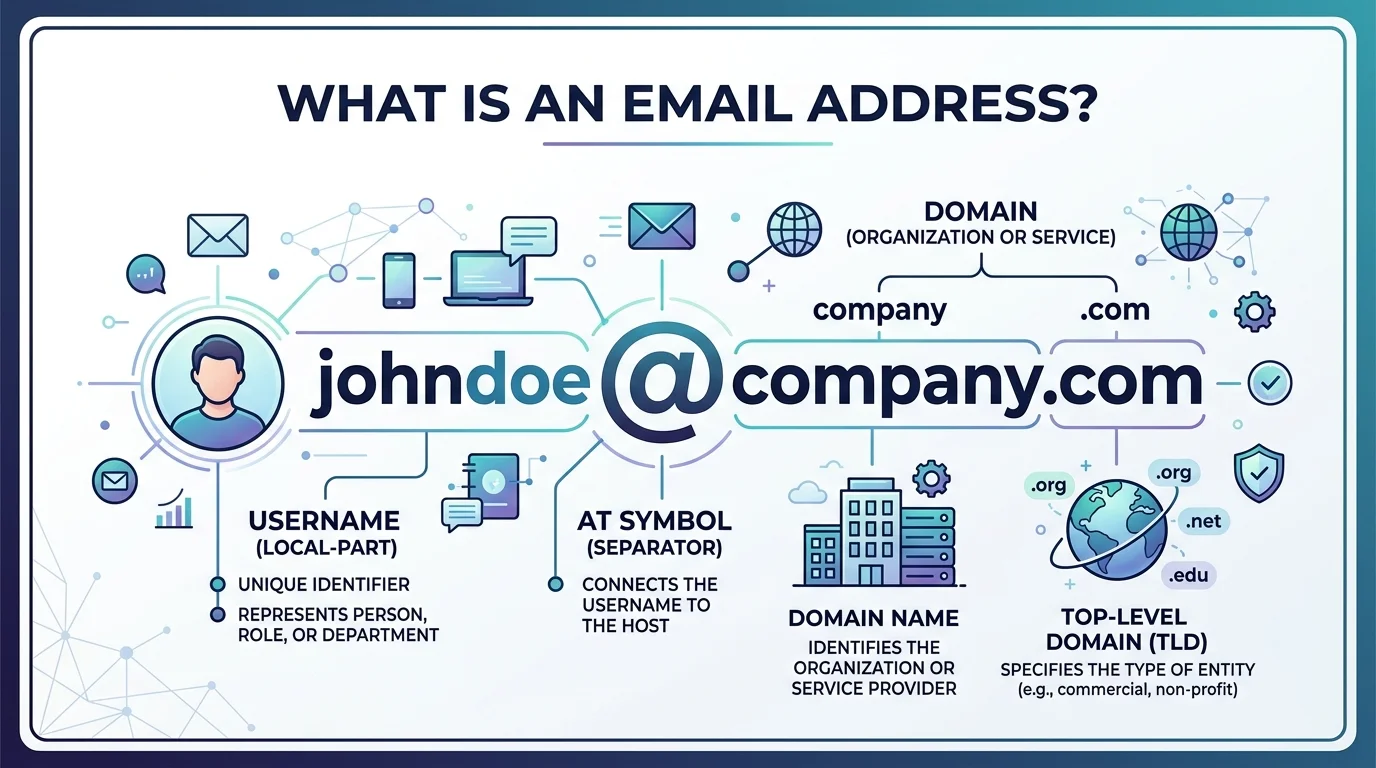
Quick Answer: An email address is a unique identifier used to send and receive digital messages, written in the format local-part@domain (e.g., jane@example.com). The local-part identifies your specific mailbox, and the domain tells the internet which mail server hosts it. This structure is defined by RFC 5322, the official internet standard.
By the end of this guide, you'll understand exactly how an email address works, why it's structured the way it is, and how to tell a valid one from a fake. Let's get into it.
What Is an Email Address, Exactly?
Here's the deal: an email address is your digital mailbox identifier. It's how the internet knows where to deliver your messages.
As of 2025, there are over 4.5 billion email users worldwide, according to Radicati Group estimates — which tells you just how foundational this simple string of characters really is.
The Local Part (aka Your Username)
The local part is everything before the @ symbol. Think of it like your name on a mailbox. According to TrueList's breakdown, the local part can contain letters, numbers, dots, hyphens, and underscores — up to 64 characters long.
Fun fact: your local part is technically case-insensitive. So JaneDoe@ and janedoe@ land in the exact same inbox.
The Domain (Where You "Live" Online)
The domain is everything after the @ symbol. It tells the internet which server hosts your mailbox. It splits into:
The second-level domain (SLD) — the brand name, like "gmail" or "yourcompany"
The top-level domain (TLD) — the ".com," ".org," or ".io" at the end
Together, they form a fully qualified domain name, which mail servers use to route your message correctly.
The @ Symbol: A Tiny Character With a Huge Story
The @ symbol wasn't always used this way. It was Ray Tomlinson who first used it in 1971 to separate a user's name from their computer's location — chosen because it was rarely used anywhere else in written text.
Next time you type an email address, remember: you're using a 50-plus-year-old design decision that changed the trajectory of digital communication.
How Email Addresses Actually Work (Behind the Scenes)
You hit send. It feels instant. But there's a whole system working behind the curtain. Here's the step-by-step version:
You hit send. Your email client hands the message to an outgoing mail server.
The domain gets looked up. The server queries the Domain Name System (DNS) for the mail exchange (MX) record of the recipient's domain.
The message routes through SMTP. Using the SMTP protocol, your message hops server to server until it reaches its destination.
The local part takes over. The receiving mail server uses the local-part to determine exactly which mailbox gets the message.
Four steps, and your message crosses the entire internet in seconds.
By the way, if you've ever wondered how CC and BCC fit into this picture once your message actually lands, this guide on what BCC means in email breaks it down clearly.
Why the Local-Part Is "Opaque" (And Why That Matters)
According to Word to the Wise, a respected voice in email deliverability, the local-part has no semantic meaning to anyone except the final receiving server. That means systems should never assume, modify, or normalize a local-part — not even by changing its casing.
This matters for anyone managing email lists or building email marketing campaigns, since mishandling local-parts can quietly hurt email deliverability without an obvious cause.
Free Email vs. Custom Domain Email: A Side-by-Side Comparison
Not all email addresses are created equal. Here's how a free webmail address stacks up against a custom domain address:
Factor | Free Email (e.g., @gmail.com) | Custom Domain Email (e.g., @yourbrand.com) |
|---|---|---|
Trust/credibility | Generic, less distinctive | Signals legitimacy instantly |
Cost | Free | Small annual domain + hosting fee |
Deliverability | Can trip spam filters more easily on bulk sends | Generally trusted more by spam filters, per BounceCheck |
Branding | None | Reinforces brand on every email sent |
Control | Limited by provider's rules | Full control over aliases, forwarding, structure |
Best for | Personal, casual use | Businesses, freelancers, professionals |
How to Spot a Valid (and Trustworthy) Email Address
Not every string with an @ symbol is a real, working address. Quick validation checklist:
Check the format. Does it follow local-part@domain?
Verify the domain exists. No domain, no delivery.
Look for MX records. This confirms the domain can actually receive mail.
Run it through an email validation tool. Checks for typos, syntax errors, and dead mailboxes.
Watch for red flags. Random capitals or garbled characters (like
R3m.1ten.te@) often signal spam-bait addresses, per BounceCheck's research.
If you're managing a larger list, it's worth pairing this checklist with dedicated email list cleaning tools to catch dead or risky addresses before they hurt your sender reputation.
Frequently Asked Questions
Is an email address case-sensitive?
No — at least not the local-part in practice. Most providers treat JaneDoe@ the same as janedoe@, though technically the specification allows for case sensitivity.
What's the maximum length of an email address?
The local-part can be up to 64 characters, and the domain up to 255 characters, per RFC 5321 limits.
Can a domain be an IP address instead of a name?
Yes. An email address can technically use a bracketed IP address instead of a domain name (e.g., jsmith@[192.168.1.2]), though this is rare in everyday use.
What's the difference between local-part and domain?
The local-part identifies the specific mailbox; the domain identifies the mail server that hosts it. Together they form the full address.
Why do some emails bounce even though the address looks correct?
A well-formatted address doesn't guarantee an active mailbox. Validation tools check MX records and mailbox status to confirm an address is actually live.
Final Thoughts
So, what's an email address? It's a structured identifier — local-part@domain — governed by internet standards that have barely changed since the 1980s, built on a symbol chosen by one engineer in 1971. Understanding the structure helps you troubleshoot deliverability, spot invalid addresses, and make smarter decisions about how you present yourself online.
About the Author

Nathan Cole
Nathan Cole is a SaaS writer and AI product reviewer at Postunreel with a sharp focus on evaluating AI-powered tools for content creators, marketers, and growing businesses. He holds a degree in Computer Science and brings over five years of experience writing about software products, productivity tools, and marketing technology. Nathan approaches every review with rigorous hands-on testing, clear comparison frameworks, and an honest perspective that cuts through marketing hype. His goal is to help Postunreel readers make smarter decisions about the tools they invest in so they can build better content workflows without wasting time or money.
🔥 Limited Time Deal
NewGet lifetime access to Postunreel with a one-time payment. Never pay again!
Your Go-To Solution for Stunning Carousels using AI!
Postunreel is a free AI carousel generator tool that helps you design captivating carousel posts for LinkedIn, Instagram, and other platforms. It makes it easier to increase social media engagement and grow your audience.
Create Free Carousel Now 🚀Related Blogs
Windows 10 Media Creation Tool: How to Download, Install, and Fix It in 2026
Step by step: download the free Windows 10 Media Creation Tool, build a bootable USB, fix error 0x80042405, and stay secure after support ended in 2026.
How to Use Google Lens: Guide for Android, iPhone, and Desktop (2026)
Learn how to use Google Lens on Android, iPhone, and desktop. Follow simple steps to translate text, shop, and search with your camera in just minutes.
Report a Problem Apple: How to Request a Refund (2026 Guide)
Use Report a Problem Apple to request a refund in minutes. Follow the simple steps, track your status, and avoid fake support scams. Updated 2026.