How Big Is 4x6 Photo? Size in Inches, CM & Pixels
How Big Is 4x6 Photo inches (10.16 x 15.24 cm), or 1200 x 1800 pixels at 300 DPI. Get size chart, crop tips and a simple 5 step print guide.
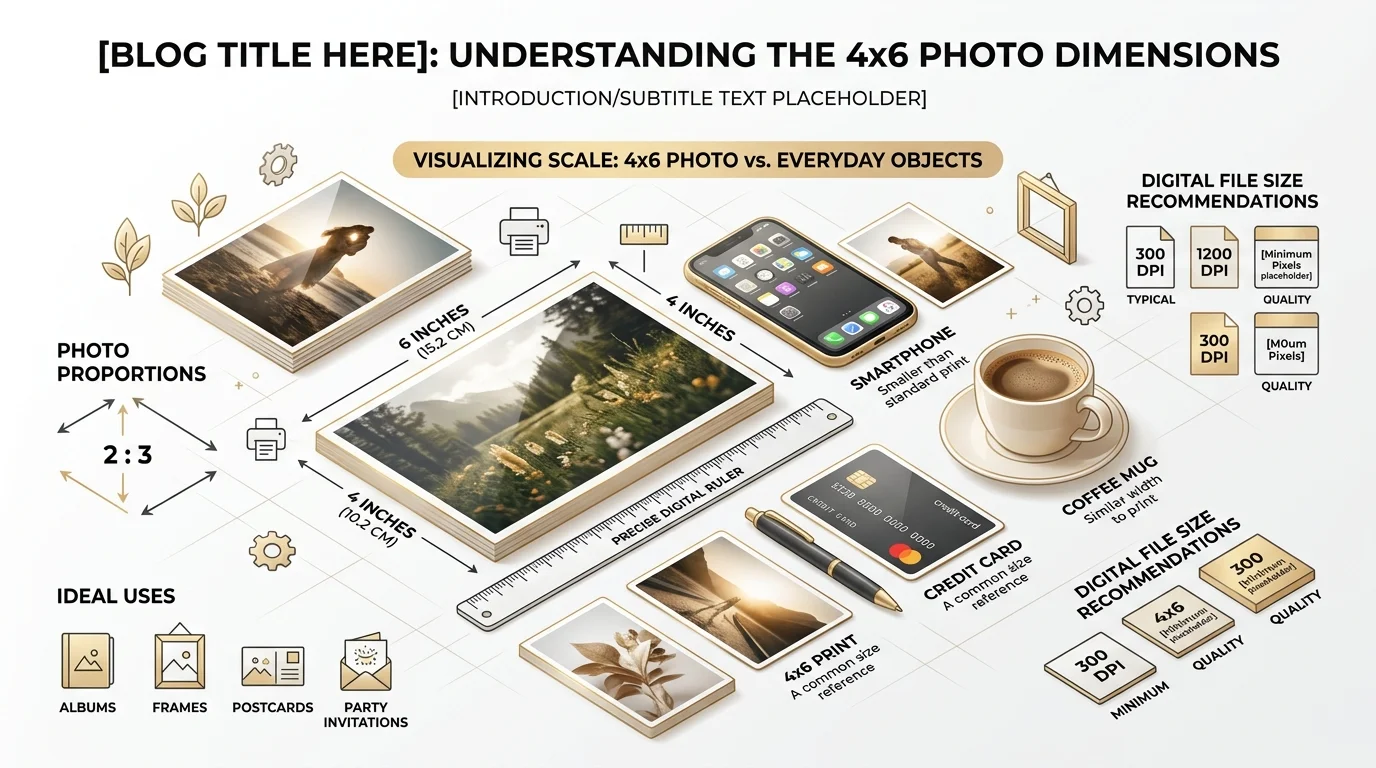
How Big Is 4x6 Photo: A 4x6 photo measures 4 inches by 6 inches, which is 10.16 x 15.24 cm or 101.6 x 152.4 mm. At 300 DPI, it needs 1200 x 1800 pixels. It uses a 3:2 aspect ratio, so it fits most camera photos with little cropping.
I work with images every day, and this question never goes away.
So let's make sure you never have to search it again.
What Is the Exact 4x6 Photo Size?
Here's the thing: the number itself is simple. What trips people up is the units, the pixels and the crop. I'll cover all three below, so you can order prints without second guessing. The 4x6 is the most popular photo print size for a reason. It fits albums, frames and pockets.
4x6 in Centimeters and Millimeters
Quick math time.
One inch equals 2.54 cm. Multiply, and you get 10.16 cm wide and 15.24 cm tall.
For millimeters, multiply by 25.4 instead. You land on 101.6 x 152.4 mm, which Graphic Aid also confirms.
Many print labs round it to 10 x 15 cm. Same standard photo size, just tidier. Some labs also call it 4R, a code you'll see on photo print size charts.
Watch Out: 4x6 Inches vs. 4x6 CM
This one catches people off guard.
In some countries, "4x6" on an ID photo form means 4 x 6 centimeters, not inches. That's only about 1.57 x 2.36 inches. At 300 DPI, it's roughly 472 x 709 pixels.
So always check the unit before you crop.
Is 4x6 the Same as A6?
Nope.
A6 paper is 10.5 x 14.8 cm. It looks like a twin, but it's a different shape. Double check before buying frames or photo paper, as Graphic Aid notes.
How Many Pixels Is a 4x6 Photo?
A print has a physical size. A digital file has pixels. The bridge between them is resolution, and this is where most people slip.
The formula is easy: inches x DPI = pixels.
At 300 DPI, that's 1200 x 1800 pixels. Richard Photo Lab and JD Photo both agree.
Never send a 72 DPI file to print. A print DPI calculator shows it would carry only 288 x 432 pixels, which looks blurry on paper.
Do You Need a Lot of Megapixels?
Honestly, no.
1200 x 1800 pixels is about 2.16 megapixels. Almost every phone clears that easily. Even a DPReview forum thread makes the same point: a 12 MP file is overkill for 4x6 prints.
4x6 vs. Other Photo Sizes: Comparison Table
Now let's zoom out. Seeing the sizes side by side makes your choice much easier. Pixel counts assume 300 DPI, per Canvas Discount. The 8x12 row is my own calculation using the same formula.
Print size | Centimeters | Pixels at 300 DPI | Aspect ratio |
|---|---|---|---|
4x6 in | 10.16 x 15.24 | 1200 x 1800 | 3:2 |
5x7 in | 12.7 x 17.78 | 1500 x 2100 | 7:5 |
8x10 in | 20.32 x 25.4 | 2400 x 3000 | 5:4 |
8x12 in | 20.32 x 30.48 | 2400 x 3600 | 3:2 |
See the pattern? Only 4x6 and 8x12 keep the 3:2 shape. Everything else means cropping.
Why the 3:2 Aspect Ratio Matters
Aspect ratio is simply the shape of your photo. And it decides whether your picture prints whole or gets chopped.
The 4x6 uses 3:2, which matches most DSLR and mirrorless cameras, as Wikipedia explains.
Phones are different. Most default to 4:3, so you'll need a small crop, according to BestCanvas.
And 8x10? It takes the biggest bite. A 3:2 photo printed at 8x10 loses about 17% of its width.
Want a bigger print with no cropping? Go 8x12.
How to Prepare a Photo for 4x6 Printing (Step by Step)
You don't need fancy software. Five minutes is plenty.
Step 1: Check your pixel size. You want at least 1200 x 1800 pixels. Shooting on your phone? Our guide on how to resize an image on iPhone shows you how to check and change it.
Step 2: Crop to 3:2. If your phone shot is 4:3, trim the edges and keep your subject safely inside. Need an editor? Here are the best free photo editing software options.
Step 3: Resize to 4 x 6 inches at 300 DPI. Pro Photo Studio shows the Photoshop route.
Step 4: Save as a JPEG. Keep your original safe. Always.
Step 5: Preview the crop before you order.
Don't want any cropping? Add padding instead. You'll keep the whole photo with borders, as iMResizer explains.
Pro Tip: Sharpen Last
Resize first. Then sharpen. Do it backwards and you'll amplify noise. And if the shot itself looks soft, read our tips on how to improve focus in photos before you print.
Frequently Asked Questions About 4x6 Photos
How big is a 4x6 photo in inches?
It's 4 inches wide and 6 inches tall. In portrait, that's 4 wide by 6 tall. In landscape, flip it to 6 by 4.
How many pixels do I need for a 4x6 print?
You need 1200 x 1800 pixels at 300 DPI. At 200 DPI, 800 x 1200 pixels works for casual prints, per Richard Photo Lab.
What is the aspect ratio of a 4x6 photo?
It's 3:2 (or 2:3 in portrait).
Is 4x6 the same as 10x15 cm?
Almost. The true size is 10.16 x 15.24 cm, and labs round it to 10 x 15 cm.
What size frame fits a 4x6 photo?
A 4x6 frame. Standard frame sizes follow the same dimensions as print sizes, according to Canvas Discount. Bigger frames work too, if you add a mat. For display ideas, see our wall art and home decor guide.
Can I print a phone photo at 4x6?
Yes. Just crop it from 4:3 to 3:2 first, so nothing important gets cut off. If you edit on iPhone, try one of the best free photo editing apps for iPhone.
Why You Should Order 4x6 Prints Today
Here's my honest take.
Photos on your phone are basically invisible. You'll never scroll back to that beach trip.
But a printed photo sits on your desk. It makes you smile every morning.
And 4x6 is the smartest place to start. It's cheap. It's compact. It needs almost no cropping. And it fits nearly every album and frame on the planet.
So stop scrolling and start printing.
Pick your ten favorite shots, follow the five steps above, and place your order today. You'll thank me the moment that first envelope lands in your hands.
Ready to order? Get your 4x6 prints now and turn your best memories into something you can actually hold.
About the Author

Laura Whitmore
Laura Whitmore is an Instagram content strategist and visual design writer at Postunreel, specializing in carousel post design, visual storytelling, and audience engagement tactics for Instagram and other image-first platforms. She brings four years of experience working with lifestyle brands, e-commerce businesses, and independent creators who want their social media content to look polished and perform consistently. Laura combines her passion for great design with a data-driven approach to content, regularly testing new carousel formats and visual styles to discover what drives the highest engagement rates for Postunreel users.
🔥 Limited Time Deal
NewGet lifetime access to Postunreel with a one-time payment. Never pay again!
Your Go-To Solution for Stunning Carousels using AI!
Postunreel is a free AI carousel generator tool that helps you design captivating carousel posts for LinkedIn, Instagram, and other platforms. It makes it easier to increase social media engagement and grow your audience.
Create Free Carousel Now 🚀Related Blogs
How to Invert Colors on iPhone (2026 Guide)
Learn how to invert colors on iPhone in seconds. Compare Smart vs Classic Invert, set a triple click shortcut, and fix common glitches.
Dark Blue Hex Code: #00008B, Navy Midnight Shades
Dark blue hex code is #00008B (RGB 0,0,139). Compare navy, midnight blue, contrast ratios, and pairing tips in this quick guide.